The Starlink Mini is not a cheaper standard kit. It is a different product built around one idea: the dish should fit in a bag and run from whatever power you have. Everything good and everything frustrating about it follows from that.
Here is what it actually is, who it suits, and where the standard kit still wins outright.
What the Mini actually is
A single unit with the antenna, the router and the Wi-Fi access point in one housing. There is no separate box to plug in, no second device to power, and one cable that carries both power and data.
That consolidation is the whole engineering story. The standard kit needs mains power at the router and a cable back to the dish; the Mini needs one DC feed and gives you Wi-Fi from the same device. It is why the Mini is the only Starlink product that makes sense on a battery.
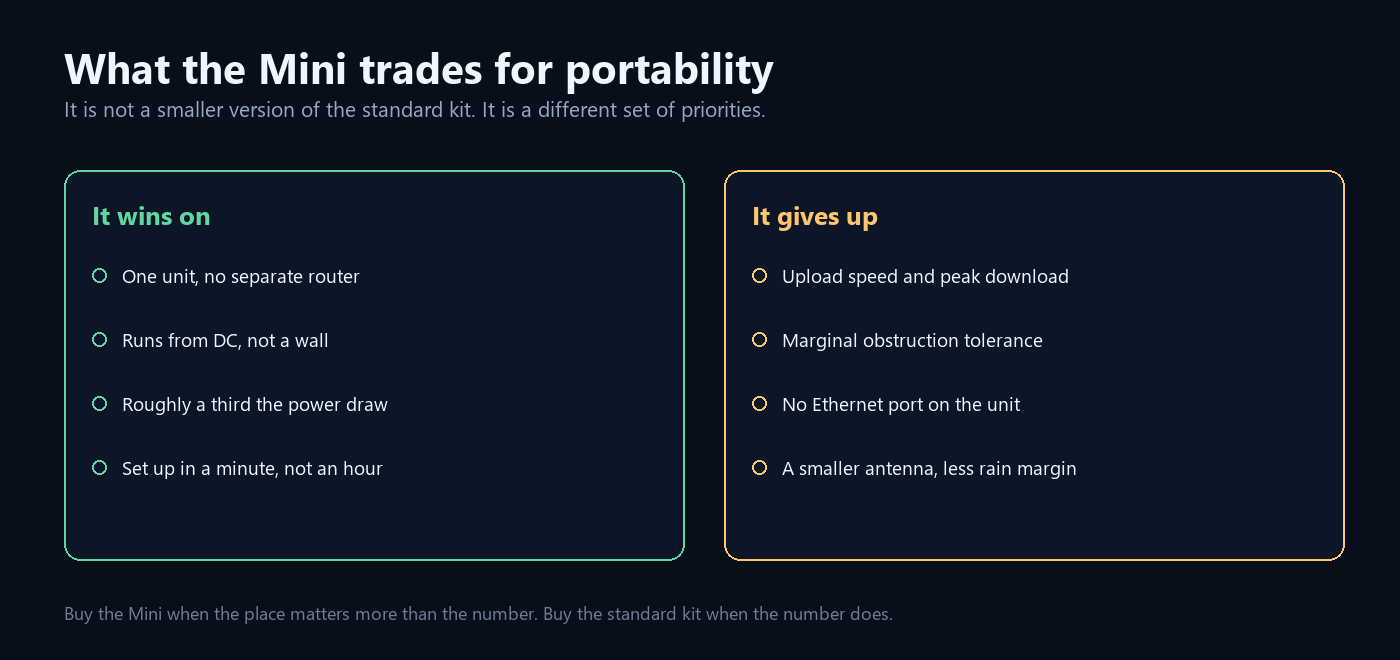
Power draw is where the difference is easiest to see. Measured averages sit in the high teens to low twenties of watts — around a third of what the standard kit pulls. Starlink’s own specification quotes a wider range that goes higher under load, which is the figure to use if you are sizing a supply for cold weather.
Where it wins, clearly
At roughly 20 W, a 500 Wh power station gives you close to a full day through an AC inverter, and more on a DC path. No other Starlink product is in that territory. The maths is in power station sizing if you want the version with the losses included.
Set it down, point the panel roughly the right way, power it, and the terminal works out the rest. For a weekend in a vehicle or a boat that is the whole point: no mast, no drilling, no aim-and-tighten cycle.
Latency is comparable because it comes from the orbit, not the dish. Throughput is not: a smaller antenna with a smaller aperture gives up peak download and, more noticeably, upload. If you mostly consume, you will not care. If you publish video, you will.
What it gives up, honestly
Obstruction margin. A smaller antenna has less ability to work around a partial obstruction. The Mini is more sensitive to the tree you thought was far enough away, and it will not quietly route around it the way a larger panel can.
Wired networking. The unit has one latching Ethernet LAN port, but it takes a Starlink plug rather than an RJ45 cable. Wired is achievable with the 15 m Mini Ethernet cable, and using a standard RJ45 cable costs you the IP67 rating. If your plan is a permanent install with a wired router, the standard kit is simply the right product.
Weather headroom. Heavy rain degrades every satellite link. A smaller aperture has less margin to lose, so the Mini feels weather first. Not a fault; a consequence of the size that makes it portable.
The two mistakes people make with it
Buying it as a home backup and mounting it permanently. The Mini is built to be placed, not installed. Bolted to a house it gives up the one advantage it has — being movable — while keeping its disadvantages: smaller aperture, no wired port, lower throughput. Anyone who wants a dish on a roof should buy the dish made for a roof.
Forgetting that portability does not create sky. The most common complaint from new Mini owners is not speed, it is obstruction. A clearing that looks open at eye level can still clip the 100-degree cone, and a small antenna has less margin to work around it. Run the obstruction check where you actually intend to put it, not where it looks clearest from the road.
Running it from power you already have
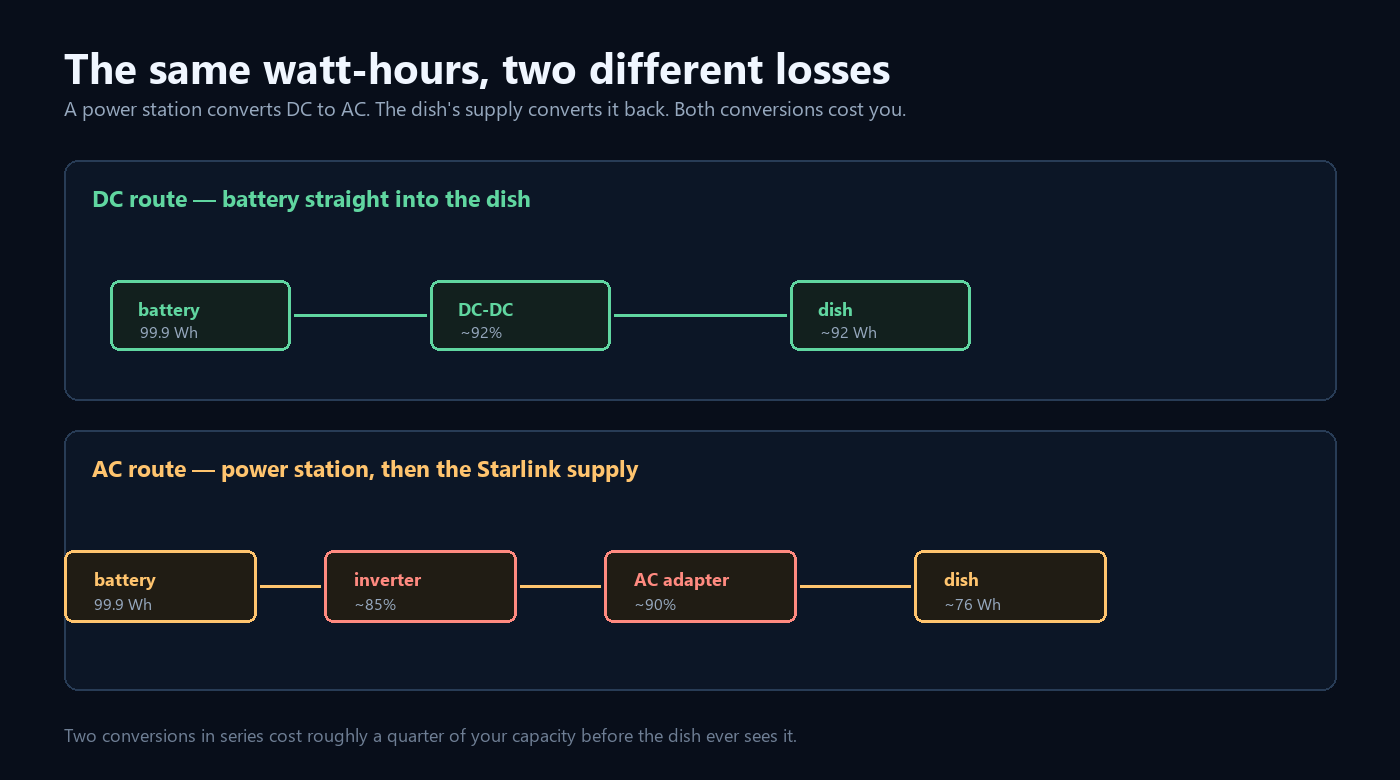
This is where the Mini earns its place in a vehicle or a boat. Because it takes DC and draws about 20 W, it can run from a cigarette socket, a portable pack, or a vehicle’s own 12 V system without an inverter in the middle.
Adding an inverter costs you about a quarter of your battery capacity before the dish sees anything, which is why the DC path matters more for the Mini than for any other Starlink product. The same 100 Wh is roughly 92 Wh usable on DC and about 76 Wh through an inverter and the supplied supply.
Mini or Mini 2
| Mini (original) | Mini 2 | |
|---|---|---|
| Wi-Fi | Wi-Fi 5, 3×3 | Wi-Fi 6 |
| Power | DC input | USB-C 60 W, or a 71 Wh clip-on battery |
| Runtime off mains | Needs an external battery | Up to about 4.5 hours on the supplied pack |
| Weather rating | IP67 Type 4 | IP67 |
| Field of view | Standard | 110 degrees |
The honest read: Mini 2 is the better portable device and the original is the better value if you already own a battery. Neither one changes what the service can do — the satellites are the same.
Who should buy which
- Van, boat, campsite, job site: the Mini, without hesitation.
- House with no fixed line: the standard kit. You want the throughput and the ports.
- House with a fixed line, plus a backup: the Mini, on a plan that allows it to sit idle cheaply.
- Two people, one account, occasional travel: the Mini, and stop worrying about a second plan.
One more thing worth knowing before you order: the Mini’s plan is not the same as a residential plan. It is designed to be used away from a fixed address, and that flexibility comes with its own terms — check what your plan allows before assuming you can leave it on a shelf for six months and keep the same price.
Do this today: if you are weighing the two, write down the upload number you actually need — not the download speed you would like. Upload is the specification that separates these two products in daily use, and it is the one nobody checks before buying.
This is part of the Starlink 101 framework. The rest of the Mini series goes deeper: what size power station it needs, how to get a wired port, and how to size a battery for it.