Starlink V5 uses roughly half the power and weighs less than half as much as the V4 it replaces, and it gives up about 25 Mbps of peak download to get there. For anyone running a dish on a battery, that first number is the only one that matters.
Here is Starlink’s own comparison, and what it changes in practice.
The numbers, side by side
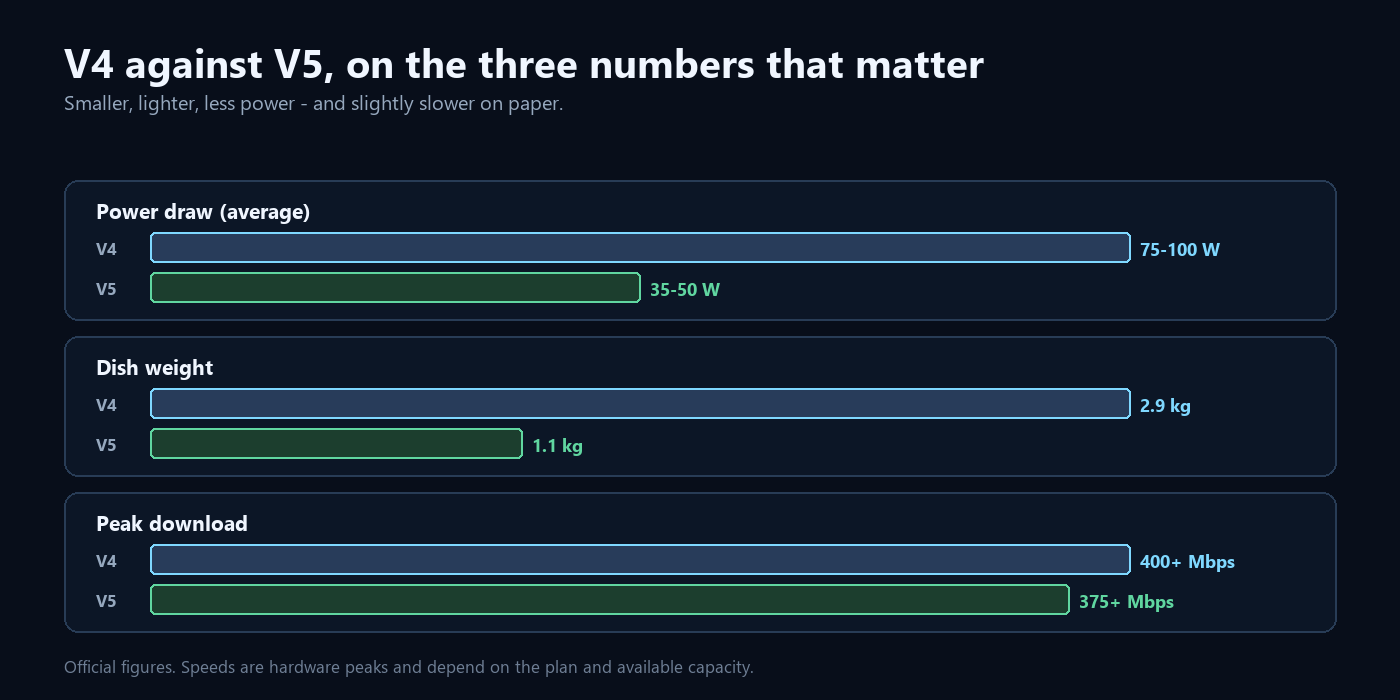
| Standard 4 X (V4) | Starlink V5 | |
|---|---|---|
| Peak download | 400+ Mbps | 375+ Mbps |
| Dimensions | 594 × 383 × 39.7 mm | 384 × 306 × 34 mm |
| Dish weight | 2.9 kg | 1.1 kg |
| With kickstand | 3.2 kg | — |
| With kickstand and 15 m cable | 3.8 kg | — |
| Kit weight | — | 3.8 kg |
| Power consumption | 75–100 W | 35–50 W |
| Power input | AC mains kit | AC mains kit, no DC input published |
| Router compatibility | Router 2, Router 3, Router Mini | Same |
Why the power figure is the real change
Twenty-five to fifty watts instead of seventy-five to a hundred is not a spec-sheet nicety. It is the difference between a battery that carries a working day and one that does not.
Take a 1,000 Wh pack, allow for usable capacity and conversion, and V4 gives you an evening. V5 gives you a full working day with margin. Nothing else in the comparison comes close to that gap in practical terms.
Who should actually care
If you are on mains power, this is a footnote. A hundred watts running constantly is noticeable on a bill, but it is not the thing that decides whether your connection works. V4 owners have no urgent reason to swap.
If you are on a battery, it is the whole decision. The energy per day is what sizes the pack, and halving it halves the pack. For a van, a boat, a cabin or an emergency kit, V5 changes the budget from “a large power station” to “a medium one” — and that is a several-hundred-dollar difference before you count weight.
If you carry it, weight matters more than watts. 1.1 kg against 2.9 kg is a dish you can move by hand versus one you plan around. Combined with the smaller footprint, it changes what a portable install looks like rather than just how much it costs.
The DC problem
Here is the part that matters most to anyone reading this site: V5 ships as an AC mains kit, with no DC input published. The Mini runs from 12–48 V directly. The V5 does not, so a battery installation has to go through an inverter.
That does not erase the advantage, but it shrinks it. Conversion costs somewhere between ten and twenty-five percent, so the numbers that reach your battery look like this.
| Dish | At the terminal | Drawn from the battery (85% efficient) |
|---|---|---|
| Standard 4 X (V4) | 75–100 W | ~88–118 W |
| Starlink V5 | 35–50 W | ~41–59 W |
| Mini (DC, no inverter) | 25–40 W | ~27–43 W |
So V5 is a genuine improvement for a battery installation, and it is not the same thing as a DC-native dish. If your install is a cabin with a power station and an inverter already, V5 is a clear win. If your install is a vehicle trying to avoid inverters altogether, the Mini’s DC input is still the reason to choose it.
Three claims worth checking
375+ Mbps against 400+ is a five percent difference in the peak figure, and both numbers are hardware ceilings rather than what a cell will deliver at 9pm. You will not notice it.
It is available in select areas and its availability will widen as production ramps. If your address is not served yet, the honest answer is still V4 — and the power difference does not make an unavailable product better.
Starlink states directly that V5 is not intended for in-motion use. If your plan is a van or a boat, that sentence decides the purchase before any specification does.
What this does to your existing accessories
A swap between generations is rarely just a swap of the dish. Three things usually need checking.
The mount. Mast diameter and the fixing pattern are generation-specific. A pole that held a 2.9 kg dish may be fine holding a 1.1 kg one, but the adapter between them is a separate part.
The cable. Connectors changed between generations more than once, and the dish end is usually the end that differs. Reusing a cable across a swap is the most common way to discover this.
The power supply. V4’s supply is sized for 75–100 W; V5’s for 35–50 W. They are not interchangeable in either direction — one will not deliver enough, the other may not negotiate correctly.
All three are answerable from photographs of the back of the dish and the label on the supply, which is faster than any compatibility table and does not go out of date.
The naming problem, briefly
V4’s customer-facing name is Standard 4 X; V4 is the internal hardware designation. It is a different product from the Mini and from Standard 4, and listings mix the terms freely.
This matters when buying accessories. A mount sold as fitting “Starlink V4” may be describing a mast diameter, while a cable sold as “V4 compatible” may be describing a connector — and those are independent facts. Photograph the back of the dish before ordering anything.
What to check before switching
- Whether V5 is actually available at your address. Not whether it exists — whether your cell can be served. The two are different questions.
- Whether you need in-motion use. V5 says no. If that is your case, stop here.
- What your existing accessories assume. Mount, cable and power supply are all generation-specific in ways the photos will reveal and the marketing will not.
- Whether the power saving pays for the swap. On mains power it does not. On a battery it might pay for itself in a season.
One caveat on the peak-download row: 400+ and 375+ are hardware ceilings, and a cell at capacity will deliver far less on either. If you are choosing between the two on speed, you are optimising the number least likely to bind in practice.
Do this today: find your current dish’s power consumption — the app’s statistics or the label — and multiply by the hours it runs. If the answer is above 600 Wh a day, the V5 power figure is worth a serious look; below that, the upgrade is about weight rather than energy.
This is part of the hardware chapter in the Starlink 101 framework. For the full generation picture, the generations comparison puts all of them in order, and what a dish actually draws turns these figures into a monthly cost.