Half the people who conclude “the dish is broken” are looking at a Wi-Fi problem, and half the people who blame the router are looking at a dish problem. The two produce identical symptoms — slow pages, dropped calls, one bad room — and the only reliable way to tell them apart is a five-minute test that costs nothing.
Do this before you contact support, buy a mesh node, or move the dish.
Three checks, five minutes
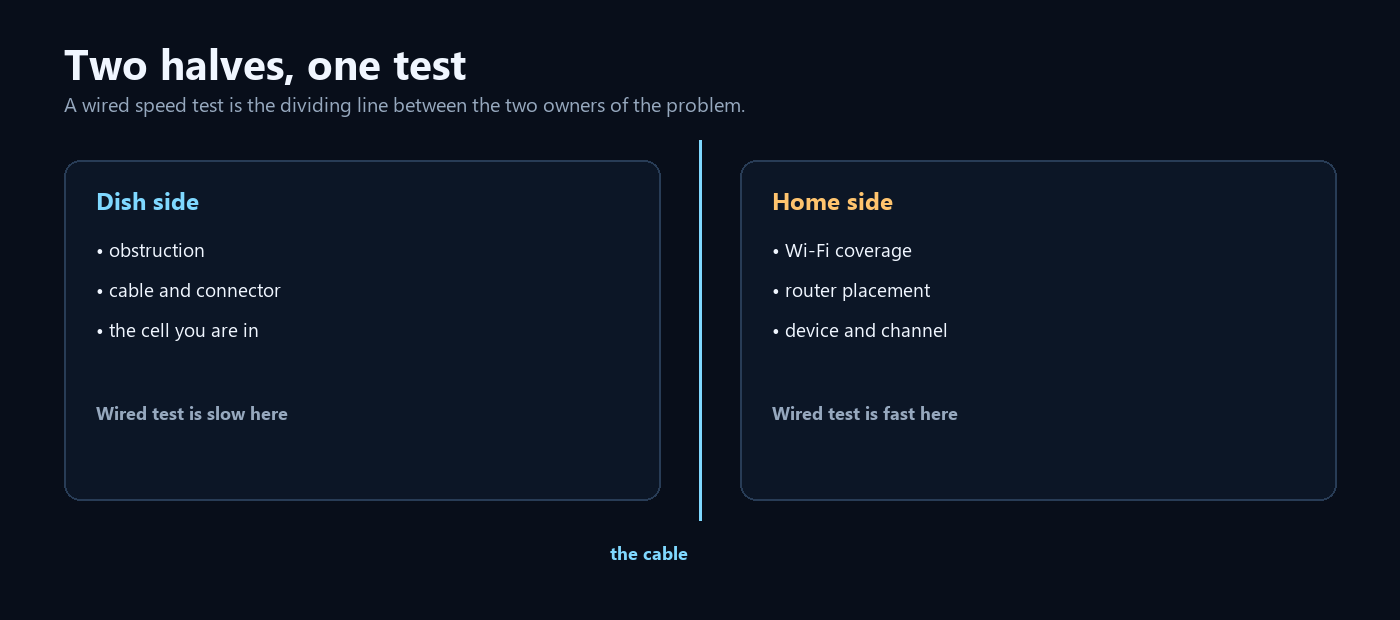
1. Test one wired device. Run a speed test from a laptop connected by cable to the router. If that number is healthy, the satellite link is healthy and everything after it is your problem to fix.
2. Compare one spot, two devices. Take a phone and the laptop to the same bad room. If the phone is fine and the laptop is not, the laptop is the issue. If both are bad in that room and fine next to the router, it is coverage.
3. Read the obstruction figure. In the app, open the visibility view. Anything above a few percent is the dish’s problem regardless of what the Wi-Fi is doing — and no router change touches it.
Reading the result
The link is fine and the radio is not. Change channel, move the router off the floor, or add a node. No dish work will help.
Now it is upstream: the terminal, its cable, or the cell. Check the cable for damage and corrosion next, then treat it as a service question.
Obstruction caps everything downstream. Fixing the view is the only change that matters, and it will improve Wi-Fi performance too, because a stalled link looks like bad wireless.
That is the cell, shared with everyone around you. Nothing in the building changes it.
What the test cannot tell you
A wired test separates dish from home. It does not separate the dish from the network it is attached to, and that is the distinction people most want.
For that you need a second measurement: the same wired test at two different times of day. If the wired number is stable at 7am and falls at 9pm, the fault is upstream in the cell. If it is equally poor all day, the fault is the install or the hardware.
Two tests, ten minutes total, and you can tell an installer, a support agent or a forum exactly which one you have — which is more than most people manage after a week of guessing.
The cheap fixes, in order
- Move the router up and out. Off the floor, out of a cabinet, away from metal. Free, and it fixes a surprising share of one-room problems.
- Change the channel. In a dense area, the default is the crowded one. Five minutes in the router settings.
- Separate the bands. If your router merges 2.4 and 5 GHz under one name, devices sometimes pick the slower one and stay there.
- Add a node — last. A mesh node is the expensive answer, and it inherits the problem if the router is badly placed to begin with.
Why the test has to be wired
Every wireless hop adds a variable: distance, walls, neighbouring networks, the device’s own antenna. A wired test removes all of them at once, which is why it is the first step rather than the last.
The exception is a Mini or a kit with no convenient wired path. In that case, stand next to the router with the device and test there — close range is the next best thing to a cable.
| Symptom | Wired result | Verdict |
|---|---|---|
| One room bad | Fine | Wi-Fi coverage |
| Everything slow | Slow | Dish, cable or cell |
| Calls drop only | Fine | Wi-Fi or uplink queue |
| Evening only | Slow | Cell load |
If you have no cable to hand
A Mini has one latching Ethernet LAN port, and using it needs a specific cable — so the wired test is not always available. The substitute is proximity: test standing next to the router, then test in the bad room, and compare.
It is a weaker test, because a laptop next to the router can still have a bad radio. But the comparison usually settles it: if the number collapses when you walk twenty metres, the link is fine and the coverage is not.
A note on mesh nodes
Adding nodes is the reflex answer to “bad Wi-Fi”, and it is sometimes the right one. The guide for the Router Mini is specific about placement: nodes no more than two rooms apart, off the floor, and away from the sort of wall that eats a signal.
What nodes do not fix is a link that is already slow. A mesh spreads a thin connection around more efficiently; it cannot create capacity. If the wired test is poor, adding nodes just distributes the problem more evenly.
When to contact support
Contact support when a wired device measures well below your plan, consistently, with a clean obstruction figure and no weather event. That is upstream of anything you own, and the wired numbers are the evidence that gets a ticket taken seriously.
Do not open a ticket about one bad room. That is a Wi-Fi question, and the answer is a node or a channel change rather than a replacement dish.
Do this today: plug one device into the router with a cable and run a single test. Whatever number appears tells you which half of the system to spend money on — and it takes less time than reading the rest of this page.
This is part of the troubleshooting index. If the wired number is healthy and the problem is stutter rather than throughput, why a speed test can be fine covers what the number misses, and what the router actually does explains the half of the path you control.