If your speed test reports 150 Mbps and the video call still stutters, the speed test is not lying — it is measuring the wrong thing. Speed tests measure throughput over a few seconds on a single stream. What you feel is latency, jitter and upload, none of which a download test reports.
This is the most common “it is broken” complaint that turns out not to be a fault at all, and it is diagnosable in about five minutes.
Three checks, five minutes
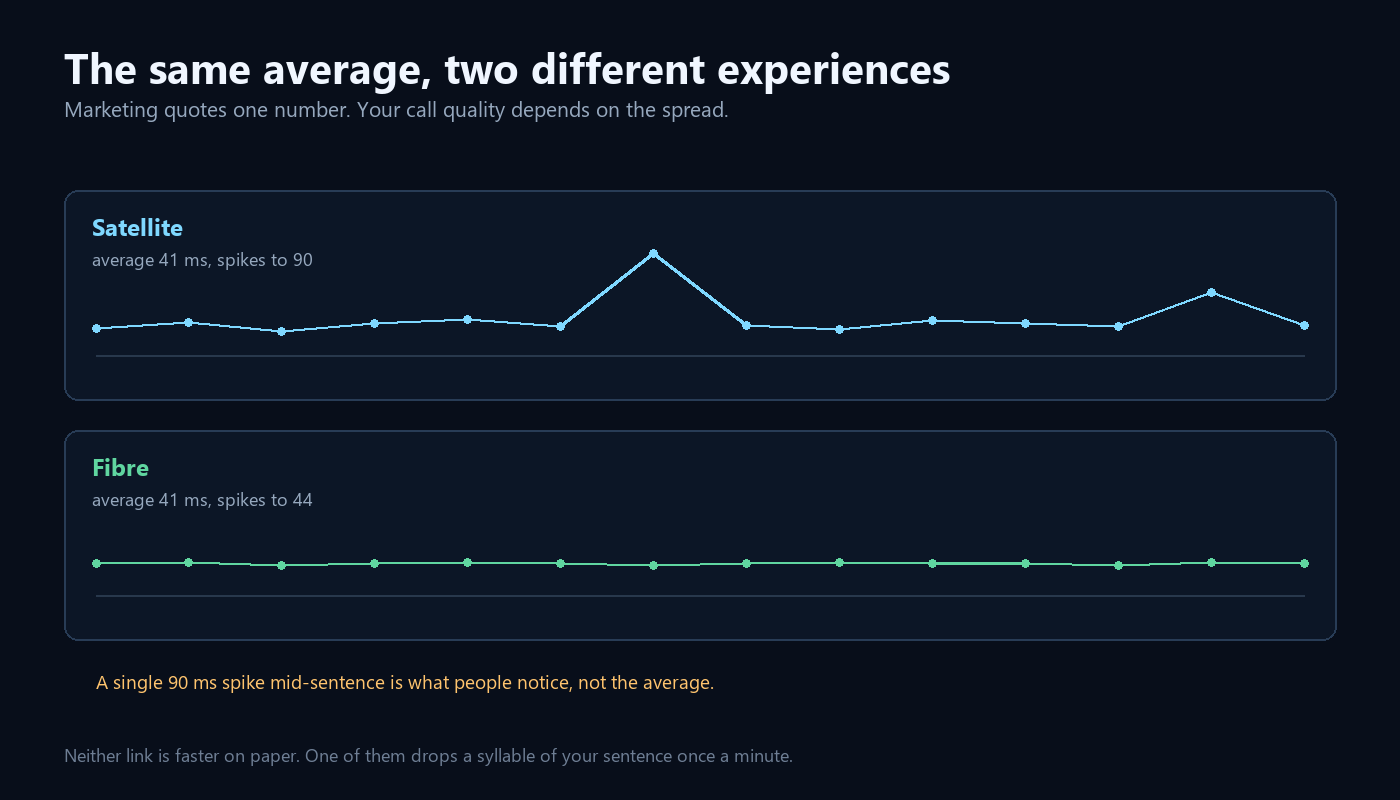
1. Run a latency test, not a speed test. Ping a server you actually use — a game server, your work VPN, a video call endpoint — for ten minutes. Look at the worst results, not the average. If the top ten are several times the median, you have jitter, and that is what stutters.
2. Check the upload number. Open the app’s statistics or run a test that reports upload separately. If upload is single digits in Mbps and something on your network is backing up photos or syncing a drive, every other device is queuing behind it.
3. Test from a wired device. One laptop on a cable, everything else off Wi-Fi if you can. If the wired device is smooth and the wireless ones are not, the satellite link is innocent and the problem is inside the house.
If those look fine, work down this list
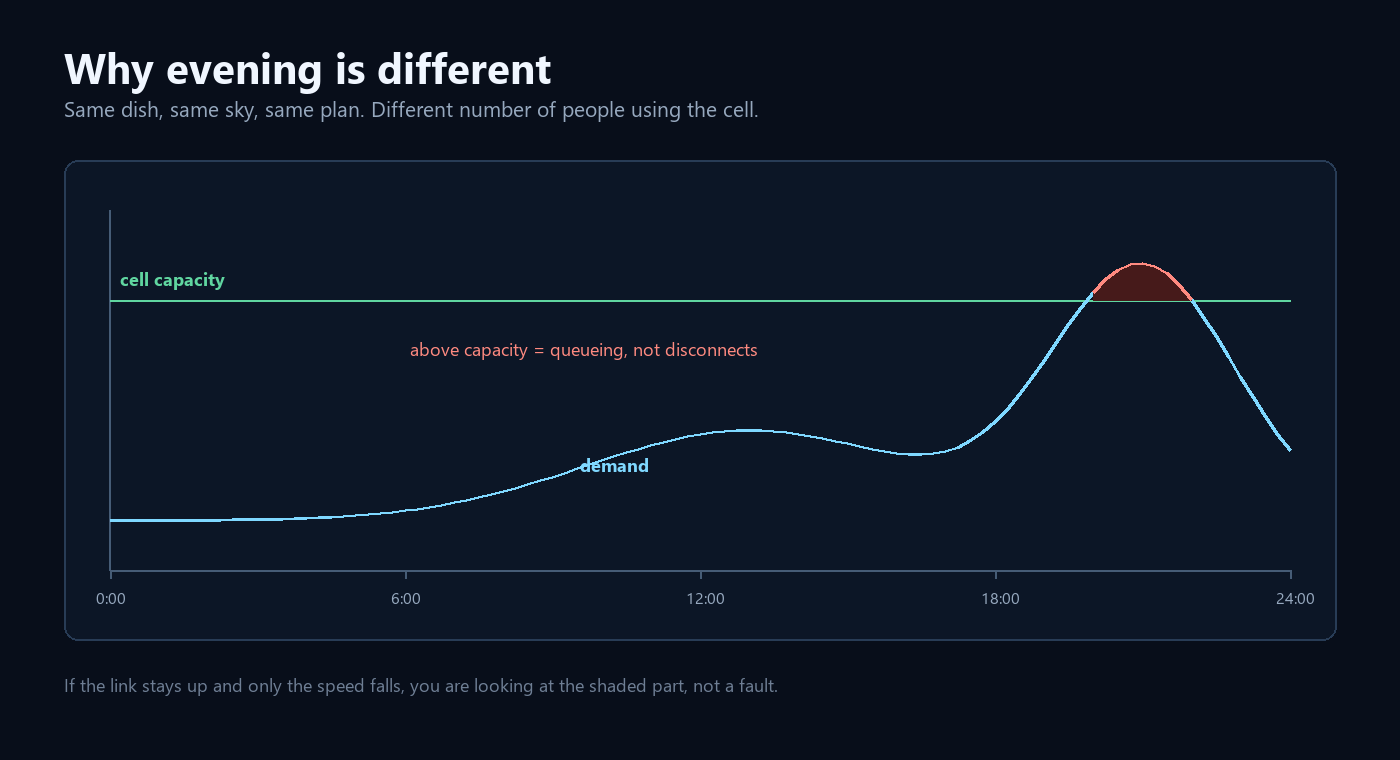
Evening demand across everyone sharing your cell pushes latency up and throughput down. Nothing in your house fixes it. Schedule large transfers outside the peak and set expectations for the evening accordingly.
Every page load is dozens of small round trips. If each round trip costs 80 ms instead of 35, a page full of assets feels sluggish even though the pipe is wide. This is the classic case where a lower-speed connection feels faster.
Calls are two-way and latency-sensitive. A saturated upload makes your voice arrive late and choppy while the download side looks perfect. Rate-limit the backup client and the calls recover the same day.
If a wired device on the router is also slow in raw throughput, this stops being a perception problem. Check the obstruction figure and the weather, and if neither explains it, treat it as a real service issue.
The word for what you are feeling is bufferbloat
When a link is saturated, packets queue. A queue that fills for a second adds a second of latency to everything behind it, and then empties and looks fine again. That is why a connection can measure 150 Mbps and still make a video call unusable: the throughput is real, but the queue is deep.
Starlink is more exposed to this than a fibre line because the uplink is the scarce direction. A single device uploading a backup can fill the queue for every other device in the house, and the symptom is not “slow internet” — it is “the call dropped again”.
Why evening looks worse on every graph
Cell demand peaks in the evening, which raises latency for everyone sharing it. That is a queue in the operator’s network rather than in your router, and it is the one variable you cannot change with hardware.
What good looks like, in numbers
Useful targets for a satellite link, measured over ten minutes rather than three seconds: a median ping in the 30–60 ms range, a worst-ten under roughly three times the median, and an upload figure high enough that a call fits inside it with room to spare.
If the median is fine and the worst ten are five times higher, the fix is queue management rather than bandwidth. Rate-limiting the heaviest uploader to roughly 80 percent of the available uplink is crude but effective: it stops the queue from filling, which is what the jitter actually is.
Why the speed test keeps passing
A speed test opens several parallel connections and fills them for a few seconds. That is a deliberately flattering measurement: it hides jitter, it ignores upload, and it runs long enough to average out the spikes that make a call stutter.
It is not a conspiracy — it is what the test was built to measure. The number is real; it is just answering “how wide is the pipe”, when your problem is “how smooth is the flow”.
| What you feel | What it usually is | Quick test |
|---|---|---|
| Video calls break up | Upload saturation | Pause backups, retest |
| Pages crawl, downloads fine | High latency | Ping ten minutes, read worst |
| Fine by day, bad at night | Cell congestion | Compare 3pm and 9pm |
| One room is bad | Wi-Fi coverage | Test wired from the same spot |
One practical note on measurement: run the ping from the device that feels slow, not from a laptop sitting next to the router. A laptop on Ethernet measures the satellite link; a phone on Wi-Fi measures the link plus your walls, and those are two different problems with two different fixes.
When to contact support
Contact support when a wired device on the router shows throughput far below your plan, consistently, across several days, with no obstruction and no weather event. That is a service-side measurement and worth a ticket. Do not open a ticket about evening slowdowns; that is capacity, and it will be closed as such.
Finally, be suspicious of any fix that arrives with a new router. Queue management helps, and a better router can help, but neither changes the cell you are in or the uplink you were sold. If the wired test is fine and the Wi-Fi test is fine, the remaining variable is shared with everyone around you.
Do this today: run a ten-minute ping to the service you actually care about and sort the results. If the worst ten are more than about three times the median, you have found your problem — and it is not bandwidth.
This is the fifth entry in the troubleshooting index. If your problem is actual disconnects rather than sluggishness, the order to check things in is the right starting point, and what latency actually measures explains the physics behind the numbers.