Half of Starlink is on the ground, and almost nobody talks about that half. A community-maintained tracker puts the network at roughly 300 gateway sites worldwide, about 250 of them operational — and that number shapes your connection more than any satellite count. The satellites get the photographs, but a satellite on its own cannot reach the internet — it needs a ground station within range to hand your traffic to a fibre cable. Where those stations are, and how far they are from you, shapes what your connection actually feels like.
This is also where most of the surprising parts of the service come from: why latency varies between two houses in the same town, and why the middle of an ocean can still get a connection at all.
What a ground station is
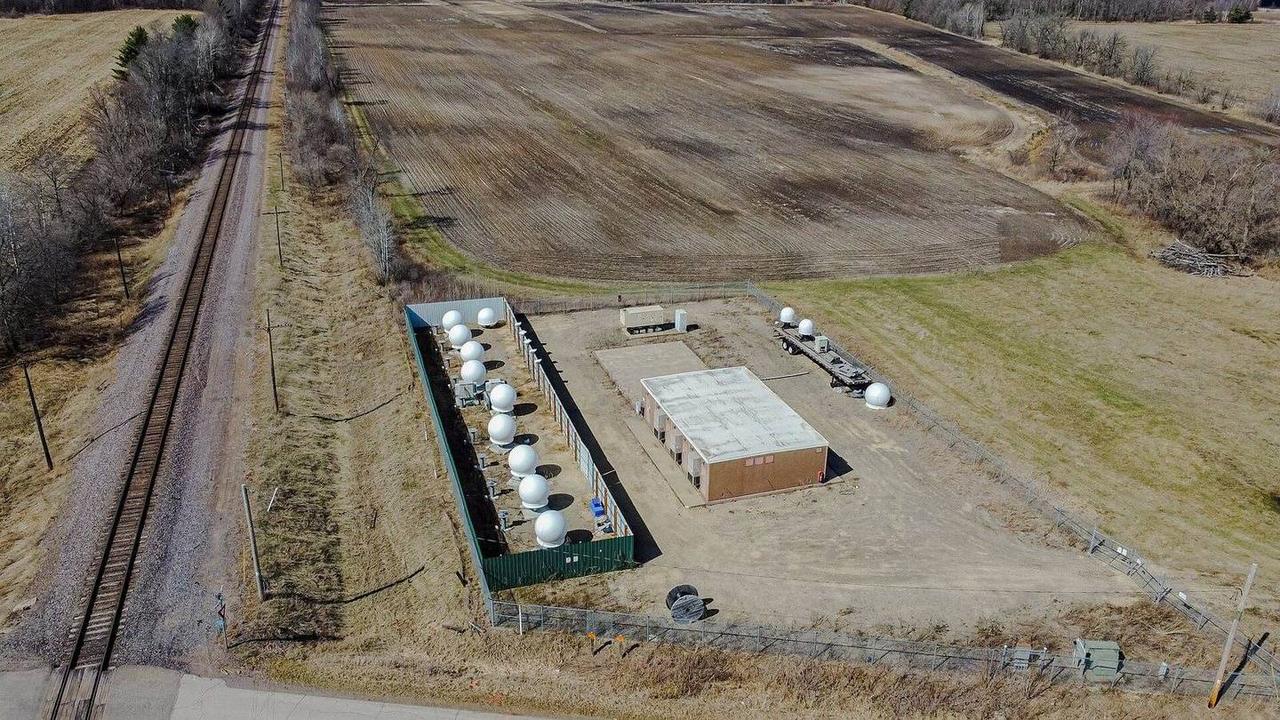
A gateway is a field of large parabolic antennas pointed at the sky, wired to a fibre connection. Its job is unglamorous: take the radio signal from a satellite, convert it, and put it onto the terrestrial internet. The dish on your roof is a small terminal talking up to a satellite; the gateway is a big terminal talking down from the same satellite at the same time.
They are strategically placed rather than evenly spread. A gateway needs fibre, power and land, which means they cluster near existing network infrastructure — coastal regions, populated corridors, and places where a fibre route already exists. That geography is invisible to you and decisive for your connection.
Two paths, and why the second one exists
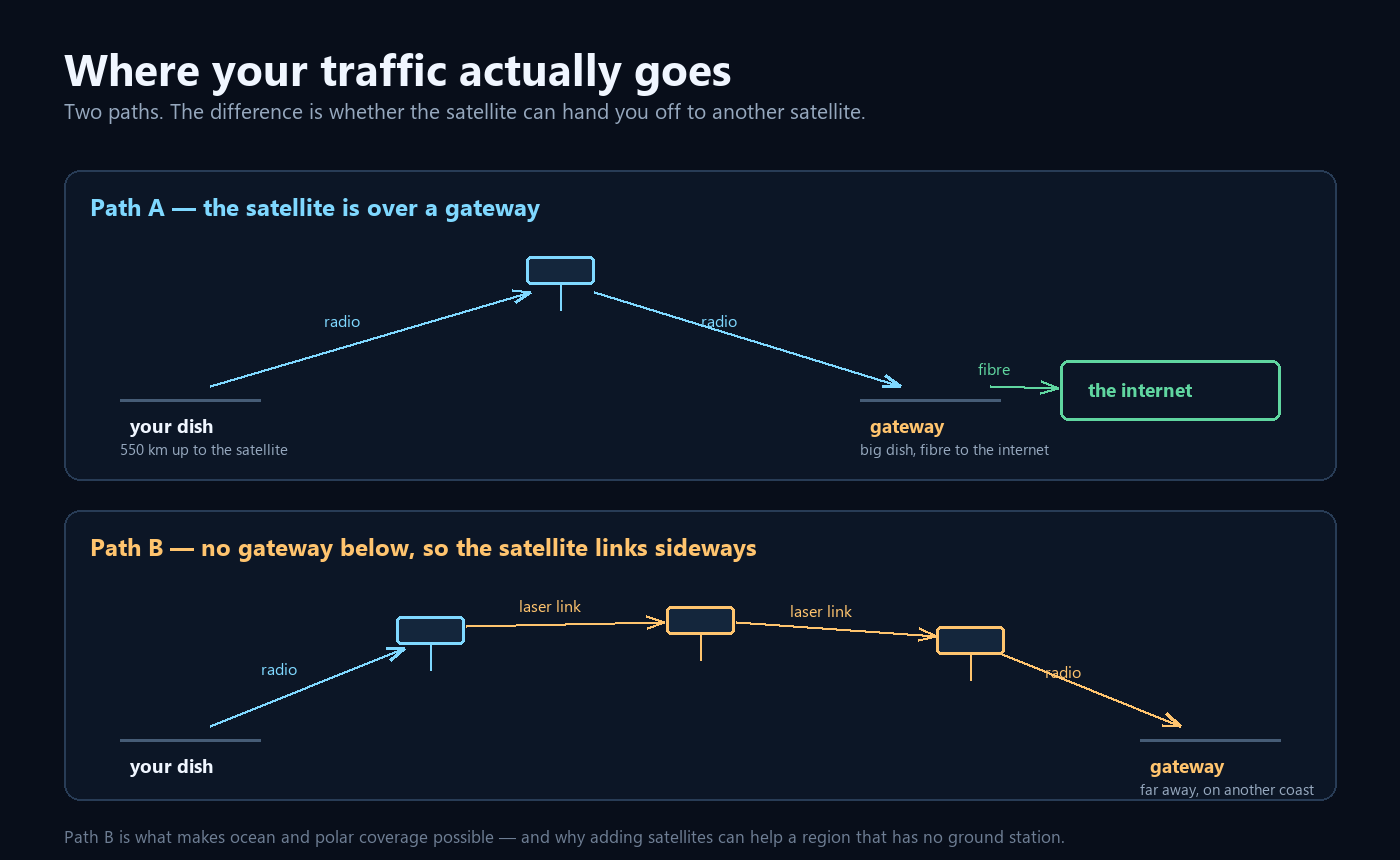
The two paths are not equally good, and the difference is worth knowing because it explains most of the variance you will see over a year of owning a dish. Path A is the default; Path B is the fallback that keeps remote regions online at a small cost.
The obvious path is the short one. Your dish talks to a satellite; that satellite is also over a gateway; the traffic drops there and joins the fibre network. Cheapest, fastest, and the way most traffic moves in populated regions.
The second path exists for everywhere else. If no gateway is beneath the satellite, it can pass the traffic sideways to another satellite by laser link, hopping across the constellation until one of them is over a gateway. That is what makes coverage over oceans and polar regions possible — there is no other way to connect a ship in the middle of the Pacific.
| Path A — direct | Path B — laser hops | |
|---|---|---|
| What happens | Satellite is over a gateway | Traffic hops sideways until one is |
| Extra latency | None | A few ms per hop |
| Where it works | Populated regions | Oceans, poles, remote interior |
| Capacity | Higher | Lower, shared across hops |
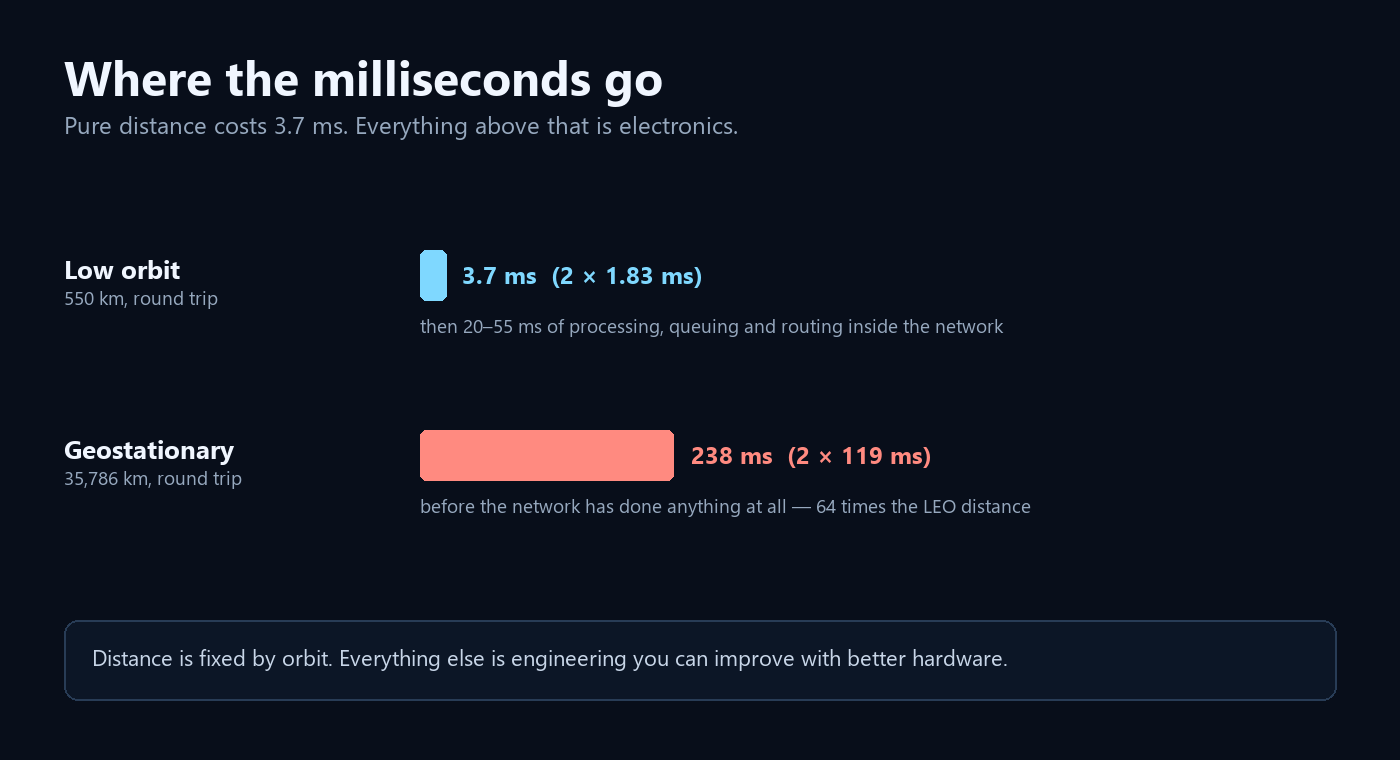
Each laser hop costs a small amount of time — a few milliseconds for the extra distance and the processing at each satellite. Add two or three hops and you can feel it in a video call; add none and the connection behaves like a short cable run. This is the honest reason two dishes on the same street plan can report different latency: they may be routed to different gateways.
Why the gateway matters more than the satellites
When people look at a coverage map, they read it as “satellites above me”. The number that actually decides quality is closer to “how many satellites above me can reach a gateway quickly”.
There is also a capacity angle that has nothing to do with satellites. A gateway is a fixed installation sized for the traffic its region was expected to produce. When a rural area grows faster than the fibre route behind it, the bottleneck appears at the field of antennas rather than in orbit — and no constellation upgrade fixes that. It is the same reason a cell can be fine in one direction and congested in another: the radio path is shared, but so is the ground path.
That explains three things people notice and rarely get explained:
- Latency that changes over months. Gateways get added, routing changes, and a dish that reported 32 ms in spring may report 26 ms by autumn without anything changing at your house.
- Neighbours with different numbers. Same cell, same satellites, different gateway assignments or different ISL routing.
- Worse performance at sea and at the poles. Fewer gateways underneath means more laser hops, which is a real cost rather than a marketing footnote.
There is a regulatory layer here too, and it explains service maps better than engineering does. Every gateway is licensed by the country it sits in. In the United States that means an FCC earth station licence. In the United Kingdom, Ofcom has consulted on individual Starlink gateway sites by name. In Australia the sites operate under ACMA apparatus licences. Parts of Europe add a further step: a Swiss municipality had to approve an antenna project before it could be built at all. So a country can sit entirely under satellite coverage and still have no service, because the ground segment is not licensed yet. When a new country appears on the availability list, what changed was often a licence and a field of antennas rather than a launch.
The same logic explains capacity differences inside one country. Gateways are sized for the traffic their region was expected to generate. A rural area that suddenly gets popular — a new subdivision, a mining camp, a summer tourist surge — can exhaust the local path long before the satellites above it are the limiting factor.
The thing you can actually observe
You cannot see your gateway from the app, but you can infer its behaviour. Watch the latency reading over a week and note the times it sits at its best. If your best numbers are consistently lower late at night, that is congestion at the cell or the gateway — the path is the same, the queue is shorter.
If instead you see a step change that persists across weeks, the path itself probably changed. That is not a fault and there is nothing to fix; it is the network being rebuilt underneath you.
Do this today: open the app and write down your latency four times — morning, afternoon, evening, late night. Four numbers across one day tell you whether your connection is limited by a queue or by distance, and those two have completely different fixes.
This is the fourth piece of the Starlink 101 framework. The step before it, why altitude sets latency, explains the floor that none of this can go below, and how the dish talks to a satellite covers the radio link at your end.