A dish that reboots is almost always a dish that briefly lost power. Starlink’s terminal does not restart itself because of a software hiccup in the middle of an evening — it restarts when the voltage at its input falls below what the electronics need, and it comes back as soon as the supply recovers.
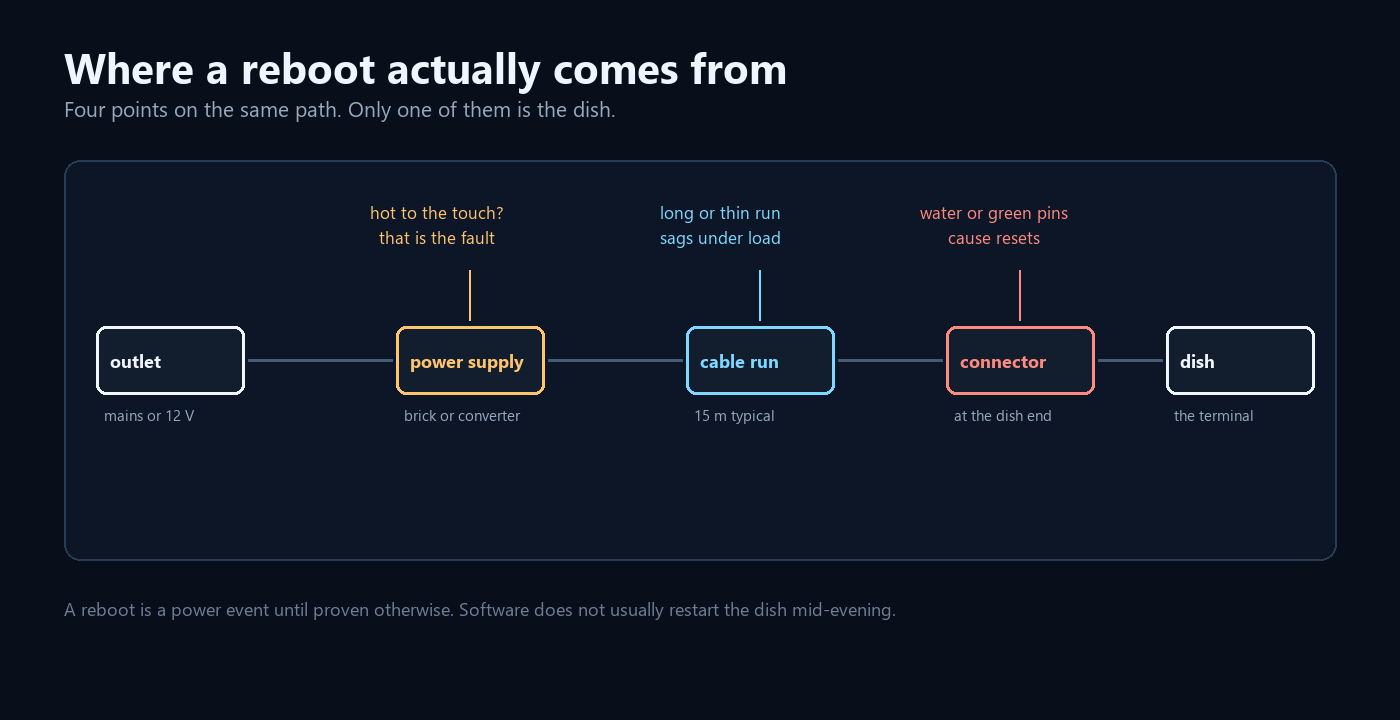
That single fact turns a vague fault into a short list. There are four points on the path from the wall to the dish, and the reboot is happening at one of them.
Three checks, five minutes
1. Touch the power supply. Not the cable — the brick or converter itself, after it has been running an hour. Warm is normal. Too hot to hold comfortably is not, and a supply that overheats will cut out, let the dish reboot, then recover as it cools. That cycle is the single most common cause of clean, repeating reboots.
2. Write down when it happens. Two patterns matter. If reboots cluster when the dish is working hard — cold nights, snow melt, heavy uploads — it is a supply that cannot deliver the current. If they cluster when the sun is on the dish, it is heat. Both are power problems with different fixes.
3. Reseat the connector, then look inside it. Unplug at the dish end, hold it up to the light, and look for green tint, darkening or a bent pin. Water that gets in leaves a deposit that adds resistance slowly, which is why a connector fault usually appears weeks after the storm rather than during it.
If those are clean, work down this list
A supply rated for peak output rather than continuous output will hold at idle and collapse under a sustained 60–90 W draw. This is common with third-party adapters and with converters bought on headline wattage. Replace it with one rated for continuous output at the dish’s real draw, and the reboots usually stop the same day.
Snow melt raises the load at exactly the moment a marginal supply has the least headroom. A system that was fine all summer can reboot in January without a single component changing. If the pattern follows the seasons rather than the clock, treat it as a capacity problem and fix the supply, not the dish.
A 12 V run has a quarter of the voltage and four times the current of a 48 V one, which makes it far more sensitive to every joint. Measure at the converter’s input with the dish running: below about 11.5 V is a fault, and the fix is a shorter or thicker run rather than a bigger battery.
A crushed, chewed or water-logged cable adds resistance exactly where you cannot see it. If the reboots began after weather, after a mower, or after someone tidied the cable with a zip tie pulled too tight, treat the cable as the suspect and test with a known-good one before buying anything else.
The terminal throttles in high heat and can restart to protect itself. The difference from a voltage fault is timing: thermal reboots follow the sun, electrical ones follow load. Shade or a little airflow usually solves it, and nothing needs replacing.
Updates install on a schedule, usually in the small hours, and the dish restarts once. One reboot per update is normal and needs nothing. A reboot every night at the same minute, on the other hand, is a supply losing regulation as temperatures drop — check the brick before blaming software.
What a reboot is not
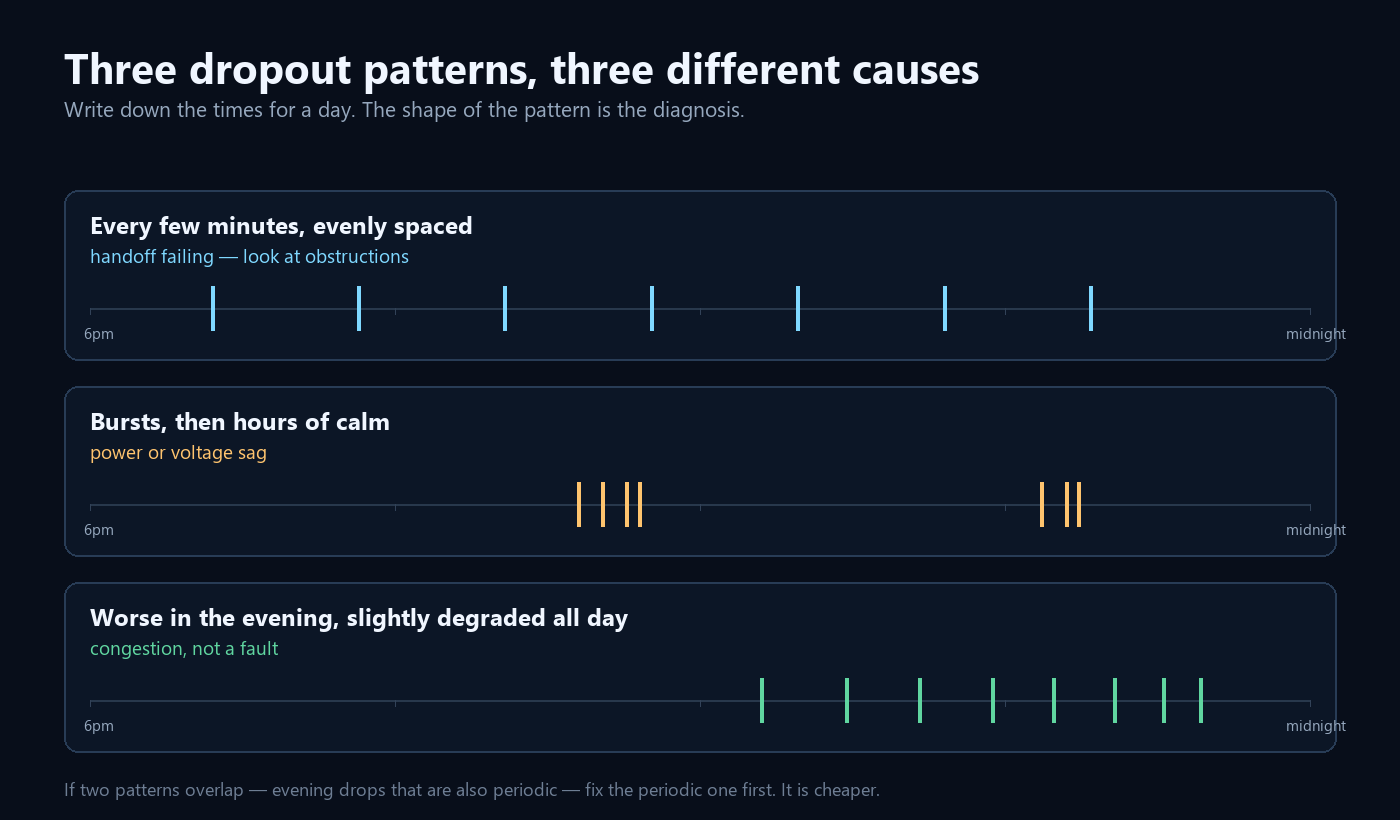
Distinguishing a reboot from a dropout saves a lot of pointless work. A reboot means the dish restarts: the app shows it reconnecting, the statistics reset, and it takes a minute or two to come back. A dropout is a connection lost with the dish still running, which points at obstruction, weather or the network rather than power.
There is one more distinction worth making, because it decides who you talk to. A reboot caused by the supply is your problem to fix. A reboot caused by the terminal protecting itself from heat, or by a fault inside the dish, is a warranty conversation. The timing tells you which: supplies fail under load, terminals fail under conditions.
The statistics screen helps more than it looks. Uptime resets when the dish restarts, so if the uptime counter is measured in minutes when the fault happens, you are almost certainly watching a reboot rather than a dropout. That one number saves you from inspecting the sky for an obstruction that was never there.
If you cannot tell which you are seeing, watch the app while the fault happens. A reboot visibly restarts the service; a dropout just stops passing traffic. Recording which one it is turns this article into a one-page diagnosis.
When to stop and contact support
Replace hardware yourself when the evidence points at a specific part — a hot supply, a damaged cable, a wet connector. Contact support when the dish reboots on the original supply, with the original cable, no obstruction and no heat, for three days running. Bring the reboot times and a screenshot of the statistics page; a pattern is actionable in a way that “it keeps restarting” is not.
When you do decide to replace something, replace in the order of cost and probability: the supply first, then the cable, then the connector, and only then consider the dish. That order is not arbitrary — it runs from the cheapest part to the most expensive, and from the most common cause to the least. It is also the order in which a support agent will ask you to test.
Do this today: put your hand on the power supply after an hour of use. If you cannot hold it comfortably, you have found the fault without spending a penny — and a replacement supply costs less than the time you would waste chasing it through every other component.
This is the second entry in the troubleshooting index. If your symptom is a connection that keeps dropping without restarting, start with the order to check things in instead. For the electrical detail behind the diagnosis, cable length and voltage drop and running on 12 V go deeper.