If your connection is fine all day and falls apart between seven and eleven at night, the first question is not what is wrong with your dish. It is whether the link is dropping or the speed is falling, because those are two completely different faults with two completely different fixes.
Evening failures split almost cleanly in two: congestion, which makes everything slower while the connection stays up, and electrical cycling, which actually restarts the hardware when the sun goes down and heaters switch on.
Three checks, five minutes
1. Watch the connection status, not the speed test. Next time it fails, open the app and look at whether it says connected. If the status stays up and pages are slow, you have congestion. If it flips to searching or the uptime counter resets, you have a hardware or power event.
2. Time it to the minute. “Evening” covers two very different patterns. A gradual decline from 7pm to 11pm that recovers overnight is demand. A sharp event at a fixed time — 18:30 when the thermostat clicks over, or dusk when the heater starts — is electrical.
3. Check who else is on the network. Evening is when the household arrives home. A single device saturating the upload with a backup will look exactly like a failing connection to everyone else in the house.
Why the evening specifically
Three separate things converge on the same few hours. Household demand peaks — streaming, gaming, calls, all at once. Cold weather brings the dish’s heater online at roughly the same time each day. And the local Wi-Fi band fills up as every neighbour’s router starts carrying video.
Any one of those would be manageable alone. Together they produce a window where three unrelated causes all make the connection worse, which is why evening complaints are the hardest to diagnose from a single observation.
If the link stays up, it is congestion
Every cell has a capacity, and demand across a day is not flat. It peaks in the evening when everyone streams at once.
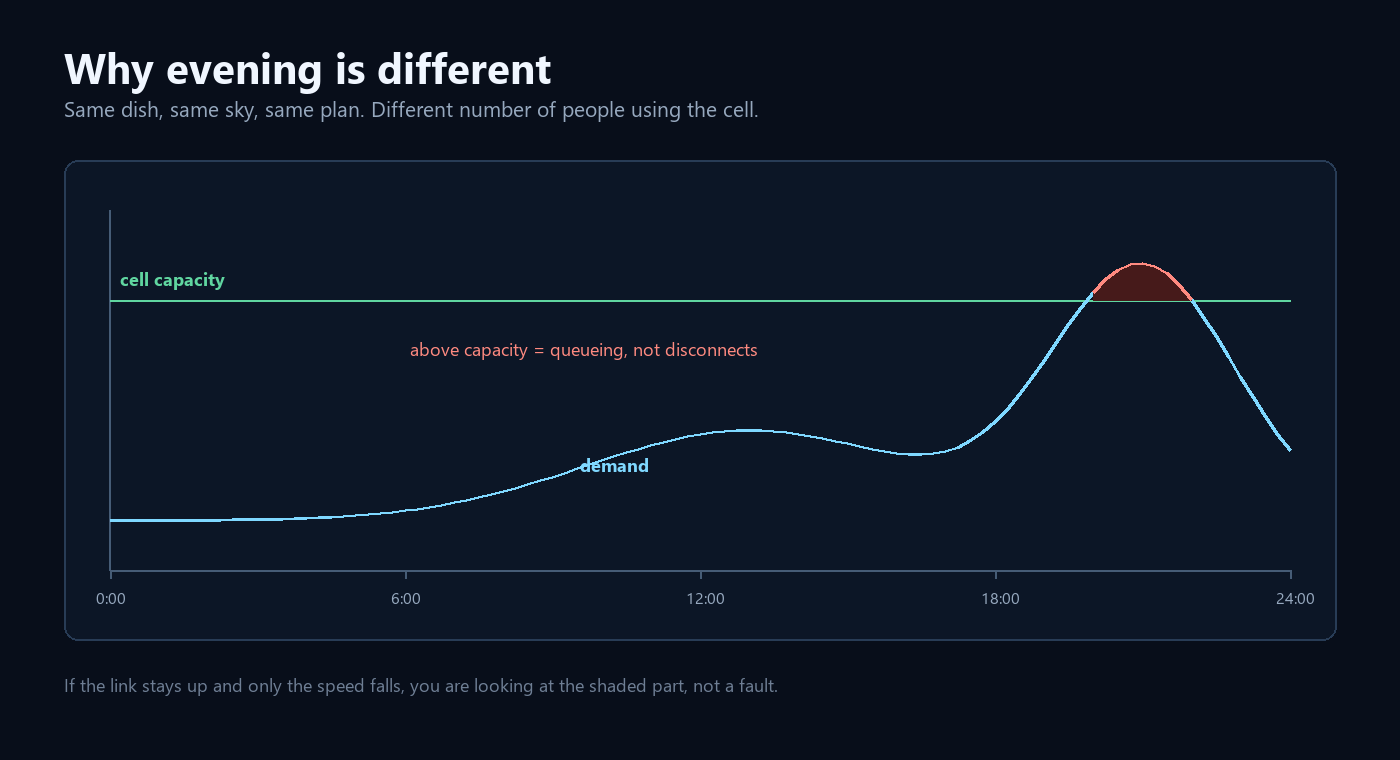
This is the normal shape of a busy cell, not a fault. Nothing in your install will fix it. What helps: schedule large transfers outside the peak, and check whether a better-placed dish would land in a less loaded sector — sometimes moving a few metres changes which satellites serve you.
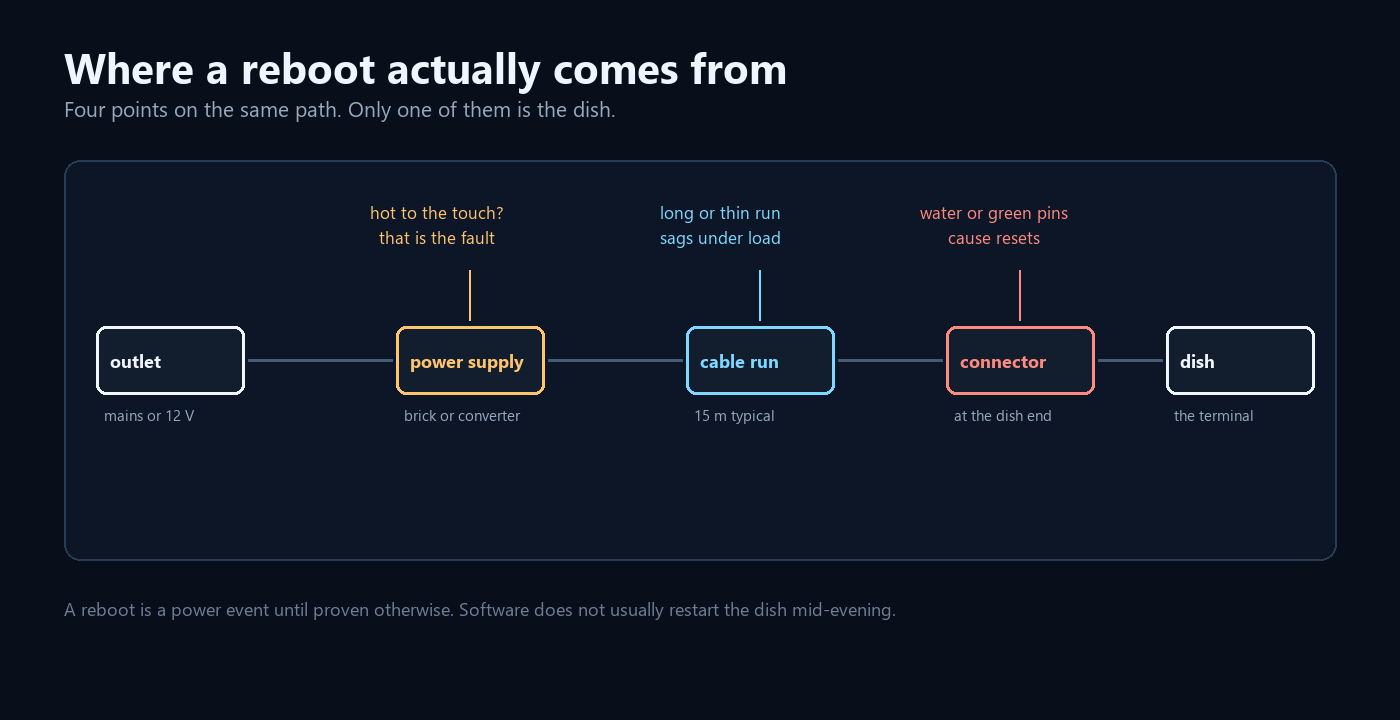
In cold weather the dish’s snow-melt draws far more than a fair-weather baseline. On a marginal supply, that extra load is what pushes voltage below the threshold and restarts the dish. The symptom looks like a network problem and is actually an electrical one.
Every neighbour’s router gets busy at the same time you do. If the wired device is unaffected, the satellite link is innocent — the problem is channel overlap and distance inside the house.
Satellite upload is the scarce direction. A single call or a cloud backup can consume most of it, and everything else stalls. Rate-limit the backup and the rest of the evening recovers.
The one thing people get wrong
They treat “slow” and “dropping” as the same complaint, tell support “it does not work in the evening”, and get a reply about congestion that does not solve anything — because their dish was actually restarting.
The distinction sounds pedantic until you price the fixes. Congestion costs you a schedule change and nothing else. Power cycling costs you a supply, and if you ignore it for a winter it can cost you a dish.
How to tell them apart in one evening
Do this once and you will never guess again. At 7pm and again at 10pm, run a speed test and note two numbers: download speed and the connection status. Then compare.
| What you see | What it means | What to do |
|---|---|---|
| Speed lower, status still connected | Congestion | Nothing; reschedule heavy use |
| Status drops and recovers | Power or thermal | Check the supply under load |
| Only wireless devices affected | Wi-Fi | Change channel, move the router |
| Upload collapses first | Something is saturating it | Find and limit the device |
What a fix looks like, in order of cost
- Nothing. Reschedule backups and downloads away from the peak. Free, and it solves genuine congestion.
- A channel change. Free, and it fixes the wireless-only version of the problem.
- A rate limit on one device. Free, and it fixes the collapsed-upload version.
- A better supply. Cheap relative to a roofer, and it fixes the dusk-restart version.
When to contact support
Contact support when the dish restarts regularly in the evening on its own mains supply, with no obstruction and no heater running, and it has done so for several days. Bring the times and the uptime behaviour — support can read restart events remotely, and a pattern of restarts is a hardware conversation.
Do not contact support about slower speeds at peak. That is a capacity property of the service, not a fault, and it will be closed as such.
One pattern worth ruling out before you spend anything: if the problem appeared in late autumn and will probably vanish in spring, it is the heater’s extra load, not the network. Seasonal faults almost always live on the electrical side, because demand on the network does not have a season.
If you want one number to track, use uptime rather than speed. A link that stays up all evening and merely gets slower has nothing to repair. A link whose uptime resets three times in an evening is telling you something specific, and it is worth acting on before the next cold snap.
Do this tonight: at 7pm and again at 10pm, take a screenshot of the app’s statistics page. Two screenshots across one evening separate all four causes above, and they cost nothing but a reminder on your phone.
This is the fourth entry in the troubleshooting index. If your drops are not tied to the time of day at all, the order to check things in is the better starting point, and reboots in bursts covers the power path in detail.