Starlink no longer sells you a dish in the US — you rent the hardware for about $10 a month and pay a service plan that is priced for your specific address. Budget roughly $840 to $1,560 for the first 12 months before taxes, depending on which tier your address qualifies for. Here is what actually goes into that number, and where people get surprised six weeks after the box arrives.
Three things you pay for, not one
Most people compare Starlink to their cable bill and forget that a cable bill bundles everything into one number. Starlink splits it into three parts, and only one of them is on the big headline price.
- The service plan. A monthly subscription, quoted for your service address. Two houses in the same state can see different numbers.
- The hardware rental. Since mid-2026, new US accounts pay a monthly fee — around $10 — instead of buying a kit outright. Cheaper up front, more expensive by year three.
- Taxes and fees. State and local sales tax applies, and in some states the rental line is taxed too. Assume 5–10% on top and you won’t be shocked at checkout.
If you want the current number for your own address, the only reliable source is starlink.com — type the address in and it quotes you availability, price and hardware terms in about thirty seconds. Any blog post with a hard number in it (this one included) is a snapshot, and Starlink has changed its pricing structure at least twice in the past year.
Why the price you see isn’t the price you pay
Starlink prices by cell — the roughly 15–25 km patch of ground your dish talks to. Cells that are full get waitlists or higher prices; cells with spare capacity get promotions. That is why your neighbor’s quote can differ from yours, and why a review written for Ohio may not describe what you’ll be offered in rural Montana.
Within a cell, plans are tiered by priority, not just speed. The cheaper “Lite”-style tier works fine for streaming and browsing, but it is the first to feel congestion at 8 p.m. The standard tier buys you a higher queue position during peak hours. Higher tiers exist mainly for business use, and they cost accordingly.
There is no contract. You can change tiers or cancel month to month — but the hardware rental keeps running for as long as you keep the kit, and returning it is your job, not theirs.
The first-year math, roughly
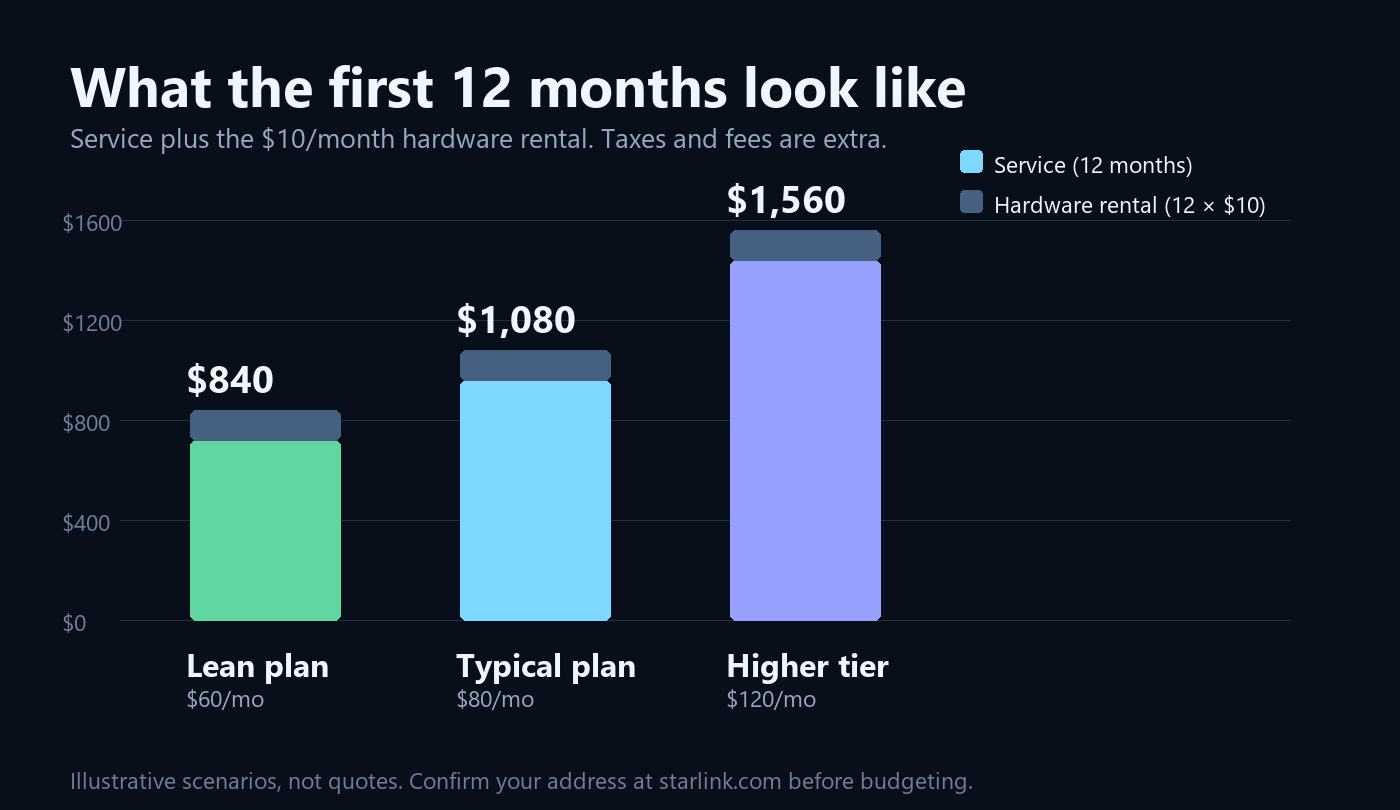
The arithmetic is simple: twelve months of service, plus twelve months of rental. At a $60 tier you land near $840; at $80, about $1,080; at $120, roughly $1,560. Those are scenarios, not quotes — the point is the shape of the number, not the exact figure.
Two things push the real total higher. First, tax. Second, the stuff that isn’t in the box: a mount that fits your roof, a longer cable run, a surge protector or small UPS. If you already have a pole and a clear view, you can skip most of that. If you don’t, add $100–$300 to year one.
What that money actually buys
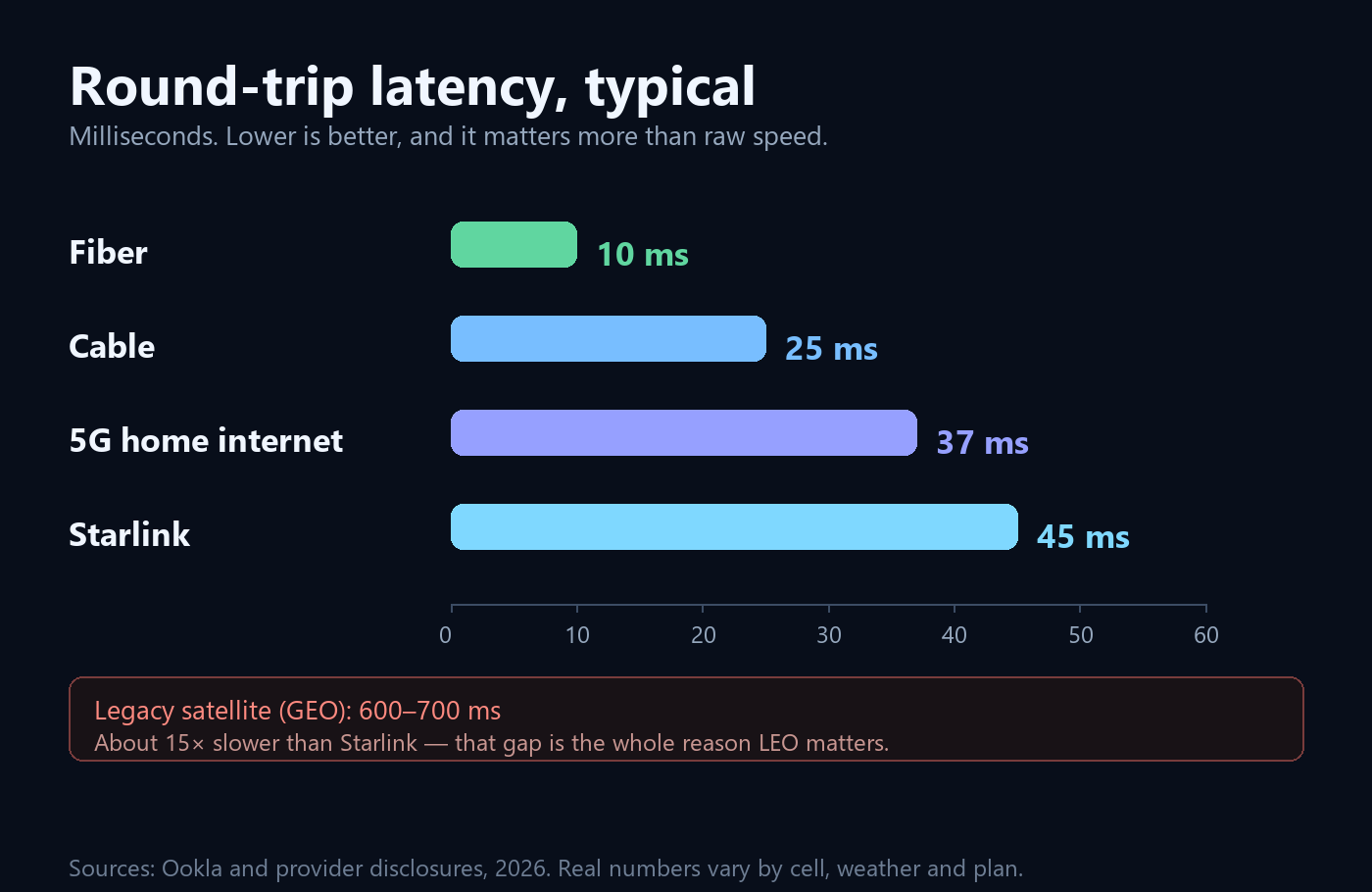
Measured against other satellite options, Starlink is not a small improvement — it is a different category. Against cable and fibre, it is roughly comparable on responsiveness and worse on everything else. That is the honest framing: you are paying for availability, not for the best connection in the abstract.
Expect 25–220 Mbps down and 5–25 Mbps up, with latency in the 25–60 ms range. Where you land depends on cell density and time of day far more than on the dish itself. Rural users routinely see the top of that range; dense suburbs see the bottom of it between 7 and 11 p.m.

The costs that never make the pricing page
| Item | Typical US range | Notes |
|---|---|---|
| Mount or pole | $50–$150 | Ground pole if you have the yard; eave mount if you don’t |
| Extra cable | $30–$80 | Standard runs are 50–150 ft depending on kit |
| UPS or power station | $150–$500 | Only if outages are common where you live |
| Professional install | $200–$500 | Worth it if you’re not comfortable on a roof |
| Sales tax and fees | 5–10% | Varies by state; rental may be taxed as well |
None of these are Starlink’s fault, and all of them are real. A $1,080 service year can quietly become a $1,400 first year once the mount, the cable and the tax are in.
The offers in ads, explained
Every few weeks a headline shows up promising Starlink for a fraction of what you expected — a $40 tier, a free Mini, a first-year discount. Most of them are real, and almost all of them have a condition attached. The three shapes worth knowing:
- A cheap tier with a catch. Lower-priced plans usually trade priority data or peak-hour speed for the lower bill. Fine if you stream in the evening and don’t care about 4K at 9 p.m.; not fine if you work nights.
- Hardware bundled “free.” A Mini included with a residential plan sounds like a $600 gift until you check whether the rental fee still applies and how long you have to keep the plan to avoid a clawback.
- Time-limited discounts. Often six or twelve months at a reduced rate, reverting to list price after. Multiply the post-promo number by twelve before you decide, not the promotional one.
The rule that saves the most money: price the plan at its normal rate, then decide whether the promo is a bonus rather than the reason. If the deal only works at the discounted price, it doesn’t work.
Five legitimate ways to pay less
- Take the cheaper tier if you’re not a peak-hour power user. The difference shows up at 8 p.m., not at 2 a.m.
- Ask about credits at order time. Promotions rotate constantly; the chat agent can see ones the landing page doesn’t show.
- Reuse an existing mount and cable run. A satellite-TV mast is often a perfectly good home for a dish.
- Pause rather than cancel if the place is seasonal — you keep the hardware and the account.
- Don’t buy a second kit for the RV. Move the dish with a roaming plan instead of paying two rentals.
Who should not pay for this at all
If cable or fibre already reaches your address, Starlink is the more expensive, slower-uploading option — and it will stay that way. If your only realistic spot is a balcony facing a courtyard, the obstruction map will tell you the truth before the credit card does. And if your work is heavy upload — video editing, live streaming, large backups — 5–25 Mbps up will frustrate you no matter how good the download looks.
The practical next step
Put your address into starlink.com, note the monthly figure it quotes, multiply by twelve, add $120 for the rental and whatever your state taxes, then compare that single number to what you pay now for how you actually use the connection. If the gap is small and your current option is unreliable, Starlink is an easy call. If the gap is large and your cable works fine, it isn’t.
For the wider picture — what the service is, how it performs, and how to get more out of a dish you already own — start with the practical guide for buyers and current owners, or see what this site covers.
Figures reflect publicly reported US pricing and hardware terms as of November 2026, plus illustrative scenarios for planning. Starlink prices by service address and changes plans frequently — confirm your own quote at starlink.com before committing. Speed and latency ranges come from third-party testing and will vary by cell, weather and plan tier.