It is 8:40 on a Tuesday, the first call is at nine, and the laptop is at 40 percent. That is the moment an off-grid office stops being a hobby: the internet is not the constraint, the total energy for a working day is, and the dish is only one line item on the bill.
Most people size a power system for the terminal and then discover the laptop and monitor together use more than it does. Here is the honest version of that arithmetic.
The day, itemised
An eight-hour day with a Mini, a router, a laptop and an external monitor comes to roughly 784 Wh before any conversion losses. The terminal contributes about a fifth of it.
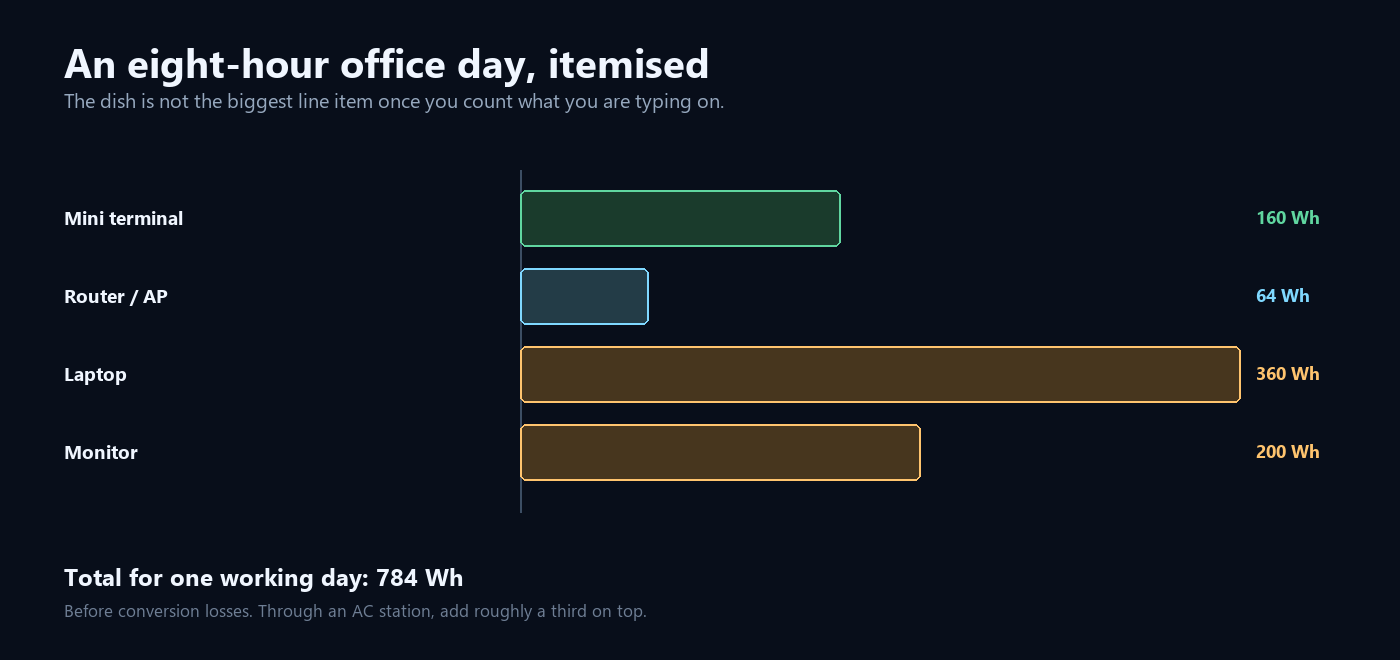
| Item | Draw | 8 hours |
|---|---|---|
| Mini terminal | ~20 W | 160 Wh |
| Router or access point | ~8 W | 64 Wh |
| Laptop | ~45 W | 360 Wh |
| External monitor | ~25 W | 200 Wh |
| Total | — | 784 Wh |
What that means for the battery
784 Wh is the raw figure. A 1,000 Wh station has about 880 Wh usable after depth of discharge, which covers one day with very little margin — and nothing at all for a second cloudy one.
Two ways out, and the right one depends on how you work. Either buy roughly double what the day needs, or cut the day’s consumption. The second is cheaper and usually overlooked.
- Drop the external monitor. It is the easiest 200 Wh to save and the only item that is a preference rather than a requirement.
- Charge the laptop from the same DC pack, not its own brick. A laptop on USB-C PD draws less than the same laptop through an AC adapter, and skips an inverter.
- Put the router on the smallest supply it will accept. A travel router can draw half what a full-size one does.
If the office is a vehicle, the maths changes twice
A van office adds two factors that a cabin does not: the interior gets hot, and the vehicle itself is a charging source that only works while you drive.
Heat matters because the same 784 Wh day now happens at 35 °C inside a metal box. That does not reduce capacity the way cold does, but it derates the inverter and shortens the life of any pack left at full charge in the sun. Park in shade, vent the space, and do not store the pack at 100 percent between trips.
The charging source is the more useful observation. A vehicle alternator delivers far more energy per hour than a folding panel, and it does it whether or not the sky is clear. If the working day involves any driving at all, charge then — the panel is for the days you stay put.
The first hour uses more than the rest
Starting a laptop, connecting to a call, waking a monitor and booting the terminal all happen in the same twenty minutes. That cluster is not visible in an eight-hour average, and it is exactly when a marginal pack trips.
Two things make the morning easier. Keep the router on its own small supply so the network is up before anything else boots, and let the laptop charge during the previous evening rather than in the morning rush. Neither costs money; both remove the most common cause of a failed first call.
What not to buy for an office setup
A large inverter is the tempting purchase and the wrong one. It adds idle draw, adds conversion loss, and does nothing for the two problems that actually stop work: running out mid-call, and losing the router when the pack swaps.
What is worth buying is unglamorous: a second pack of moderate size, a small UPS for the router, and USB-C PD chargers that let every device charge from DC. Together they cost less than the oversized inverter and solve both problems.
The part everyone gets wrong: continuity
An office day has one hard requirement that a campsite does not: it cannot drop a call to swap a battery. Runtime in hours is the wrong metric for a meeting — what matters is whether a transition happens at all.
That is what a small UPS is for, and it does not need to be large. Five minutes of hold-up is enough to swap packs or start a generator, and it costs far less than sizing the main battery for the worst case.
A single pack means a hard stop. Two smaller packs on a switch, or one pack plus a small UPS, means the transition is invisible to the people on the other end.
It is the most power-hungry single device you cannot do without, but in an office day it is not the biggest consumer. Sizing for the dish alone under-sizes the system by roughly four fifths.
A bigger inverter still loses the same proportion to conversion, and adds idle draw. If the goal is runtime, DC paths and smaller loads beat a larger inverter every time.
For the DC path itself, the Fusynthx PM99 power mount covers the terminal side: 99.9 Wh, a 30 V DC output for the dish, USB-C input for charging from a vehicle or a panel. It is made by Fusynthx, which is our own brand, and compatible with Starlink rather than endorsed by them. We do not sell it on this site; it is relevant here because an office day is a chain of small DC loads, and every AC conversion in that chain costs you runtime you already paid for.

A checklist for the first working day
- Run the day on paper first. List every device, its label wattage, and the hours it runs. If the total is above half your usable capacity, the plan fails on the second cloudy day.
- Decide what drops first. Write down the order: monitor off, then laptop on battery, then the dish at low power. A plan with a defined order degrades gracefully.
- Test the switch-over while nothing matters. On a Sunday, pull the plug mid-movie and see what happens. That is the only way to know the UPS actually holds the router.
- Keep a paper copy of the numbers. The day you need them is the day the battery is flat and the laptop is nearly out.
Do this today: read the label on your laptop charger and your monitor and write the two wattages down. If they add up to more than the dish, you have just learned why your first off-grid workday ran out at 2pm.
This is the second of four scenario guides in the Starlink 101 framework. For the cold-weather version of the same arithmetic, the overland power guide covers what happens at −6 °C, and power station sizing has the conversion losses in detail.