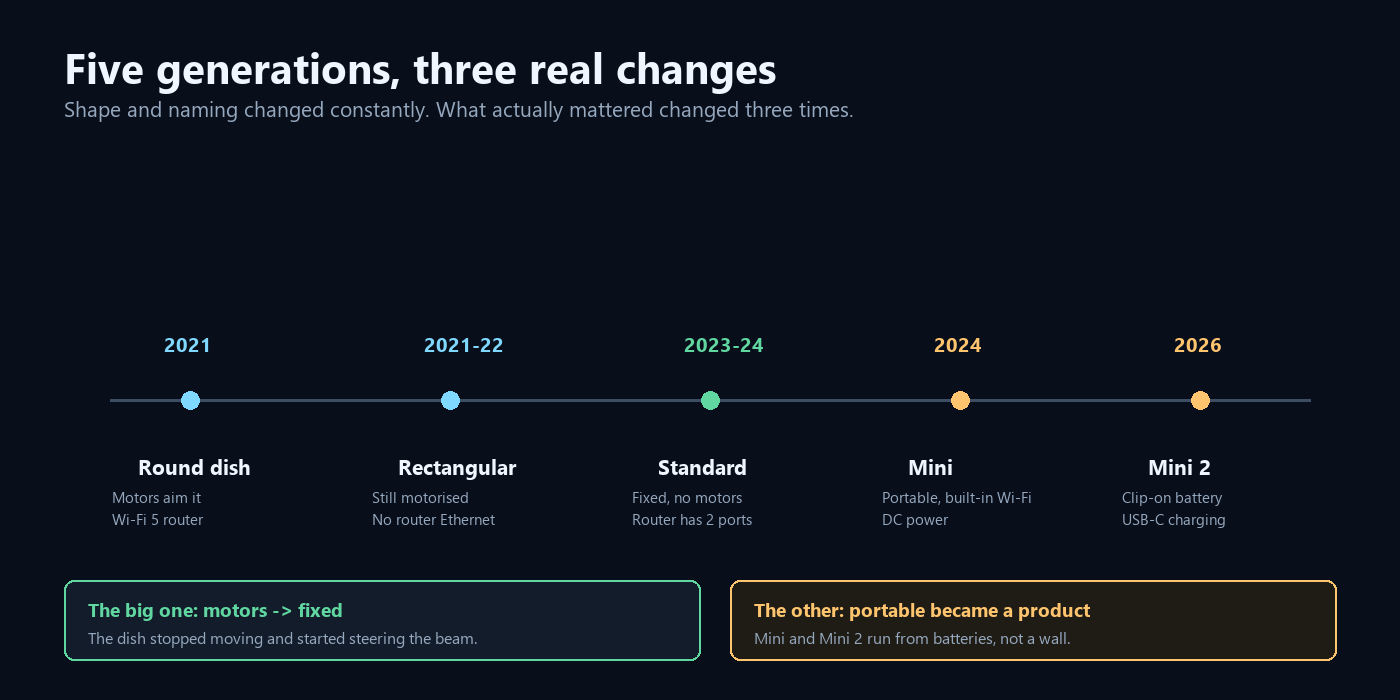
Starlink has shipped five generations of consumer hardware, and almost everything people argue about online comes down to three changes inside that list. The shapes and the names are noise; the motors, the router ports and the power connector are the substance.
This matters most if you are buying used, because a “Starlink kit” on a marketplace can be any of these and the differences decide whether it works with the mount and cable you already own.
Why the naming is a mess
Starlink did not number its hardware consistently. “Gen 2” and “Gen 3” are community labels that mostly hold, while the company’s own names shifted to descriptive tiers — Standard, Mini, Performance — which describe what the kit is for rather than when it was made.
The practical consequence: do not buy a mount, cable or adapter based on a generation number someone typed in a listing. Buy it based on the connector and the mast, which you can see in a photograph.
The three changes that matter
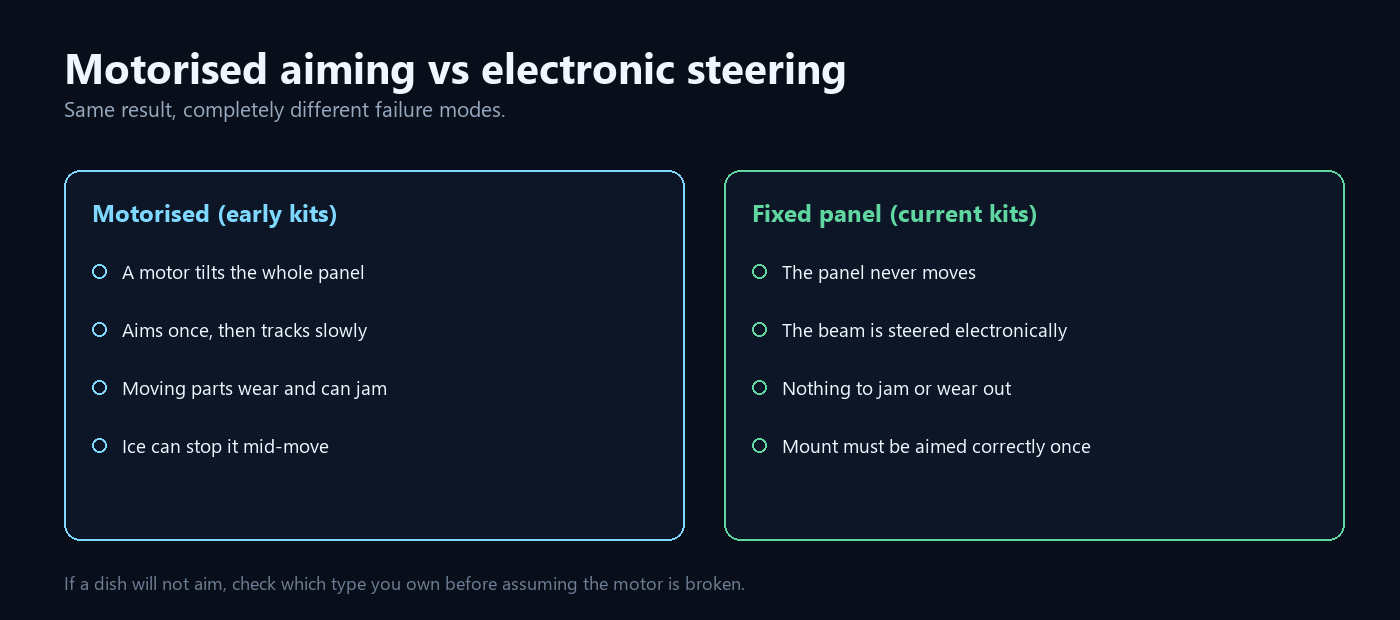
Early kits had motors that physically tilted the panel. Current Standard kits are fixed and steer the beam electronically. This is why a modern dish does not “point” at anything you can see, and why a mount that let the old one self-correct will not save a new one that is aimed badly.
Wi-Fi 6 arrived, which is a genuine improvement. But the more important change was ports: two generations shipped with no Ethernet on the router at all, and the current one has two. If you need wired, the port count decides more than the radio.
The Mini line runs from DC rather than a wall supply, and Mini 2 adds a clip-on battery with USB-C charging. That is a different product category, not a smaller version of the same one.
The generations side by side
| Era | Shape | Aiming | Router Ethernet |
|---|---|---|---|
| 2021 | Round dish | Motors | None built in |
| 2021–22 | Rectangular | Motors | None built in |
| 2023–24 | Standard kit | Fixed, electronic | Two ports |
| 2024 | Mini | Fixed, electronic | Built-in Wi-Fi only |
| 2026 | Mini 2 | Fixed, electronic | Via Router Mini or cable |
The connector is the generation
If you remember one thing from this article, make it this: the cable is how you tell generations apart. Each era uses a proprietary connector, they are not interchangeable, and a replacement costs enough to matter when you are pricing a second-hand kit.
That is also why so many accessory listings are vague about compatibility. A mount is universal; a cable is not. When a seller says “fits Starlink”, the useful follow-up question is which dish, photographed from the back with the connector visible.
Why the router port change is the sleeper issue
Two generations shipped with no Ethernet on the router at all. On paper that was a minor spec omission; in practice it decided whether a household could wire a desktop, a NAS, a printer or a second access point without buying an adapter or a second router.
The current kit router has two ports, and the standalone Router Mini exists partly to solve exactly this for setups that lack them. If you are buying used and you care about wired, count the ports in the photograph before anything else.
Which generation to buy now
- A fixed home: the current Standard kit. Fixed panel, ports on the router, no motors to wear.
- Travel and off-grid: a Mini, and only a Mini 2 if you want the battery. Otherwise the original does the job for less.
- Cheap second-hand: an older motorised kit works, but budget for the cable and check it is not locked to an account.
What to check when buying used
- Does the dish have a motor or a kickstand? A motorised unit needs power to aim and will not work on a fixed bracket the same way. A fixed unit needs the mount aimed manually, once.
- What connector does the cable use? These are proprietary and change between generations. If the seller is not including the original cable, price a replacement before you commit.
- Does the router have Ethernet ports? Look at the back of the router in the photo. Two ports means the later kit; none means you will need an adapter for anything wired.
- Is the kit still attached to an account? This decides whether you can activate it, and whether any remaining warranty is usable by anyone.
What still works across generations
Less than you would hope, which is the honest answer. Mounts and masts are the most transferable, because a pole does not care which dish sits on it. Power supplies and cables are the least, because both the voltage and the plug changed. Routers sit in the middle: they can often be used with a different dish of a compatible era, but not across the whole range.
One pattern is worth noticing: every generation made the hardware simpler to install and harder to modify. That is a good trade for most buyers and a frustrating one for the people who liked being able to move a dish between vehicles.
One more comparison worth making explicit: the dish has changed more than the service has. Speeds, latency and pricing have moved incrementally across all five generations, while the hardware on your roof went from a motorised disc to a flat panel with a battery. That is why upgrading hardware rarely changes what your connection feels like — and why buying older hardware is a legitimate way to save money.
Do this today: photograph the label on your own dish and the connector on your cable, and keep both images in one place. Every support conversation, accessory purchase and second-hand sale starts with those two photos, and nobody has them when they need them.
This is the first entry in the hardware chapter of the Starlink 101 framework. For how the fixed panel steers without moving, how the dish talks to a satellite covers the radio side, and what the router actually does covers the box at the other end.