“My speed is 150 Mbps” is not a fact about your connection, because the number is different at 6am and 9pm on the same day, with nothing in the house changing. Speed varies on five separate clocks, and most arguments about whether a connection is “good” are really arguments about which clock someone is reading.
Name the timescale first and the diagnosis usually names itself.
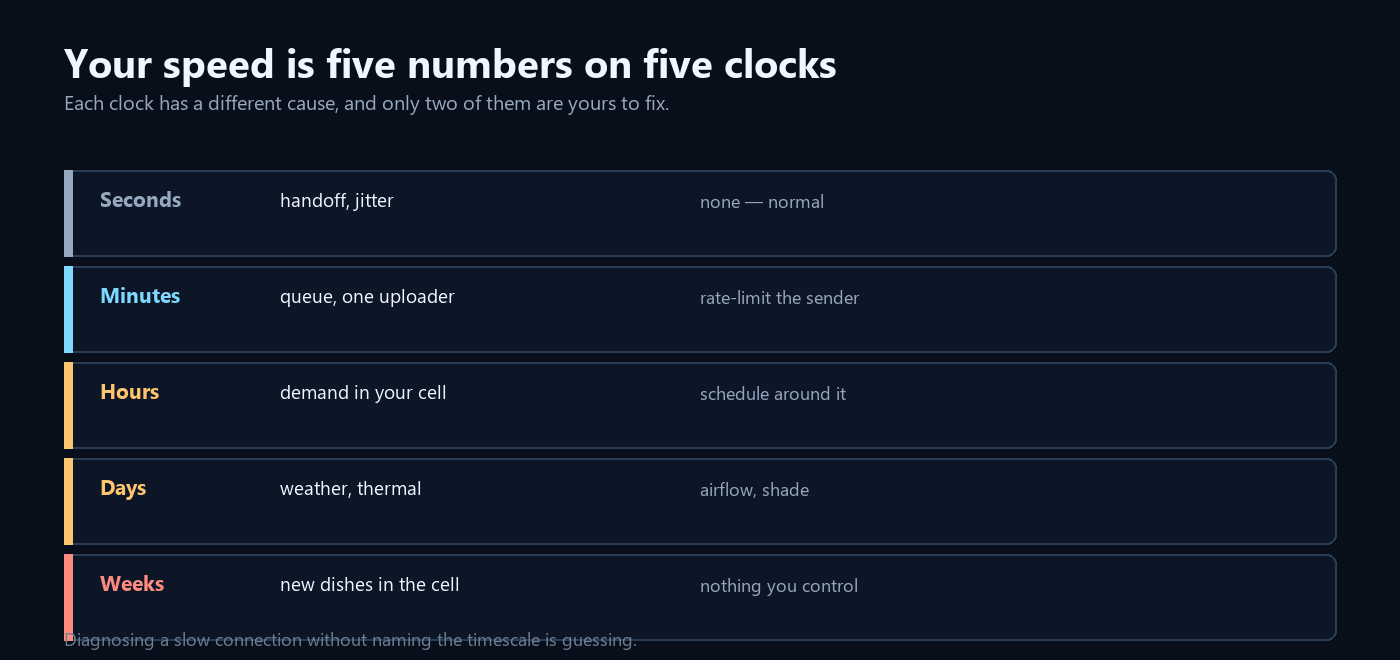
Seconds: handoffs and jitter
Low-orbit satellites move, so the dish hands off between them every few minutes. Each handoff costs a few milliseconds, and occasionally more when the incoming satellite is marginal. This is the clock that produces stutter in calls and games while throughput looks perfect.
It is not fixable and it is not a fault. What makes it worse is obstruction: a dish that loses the incoming link for a fraction of a second amplifies every handoff it attempts.
Minutes: queues you create
When the link is saturated, packets queue, and a queue that fills for a second delays everything behind it. One device uploading a backup can do this to an entire household without using much of the download capacity at all.
This is the first clock you control. Rate-limiting the heaviest uploader, or moving it to the small hours, removes the queue and the “slow internet” complaint with it.
Hours: the demand curve
Cell demand follows a daily shape: quiet before dawn, rising through the afternoon, peaking in the evening. Everyone in your cell shares it, so the number you measure is a function of what everyone else is doing at that hour.
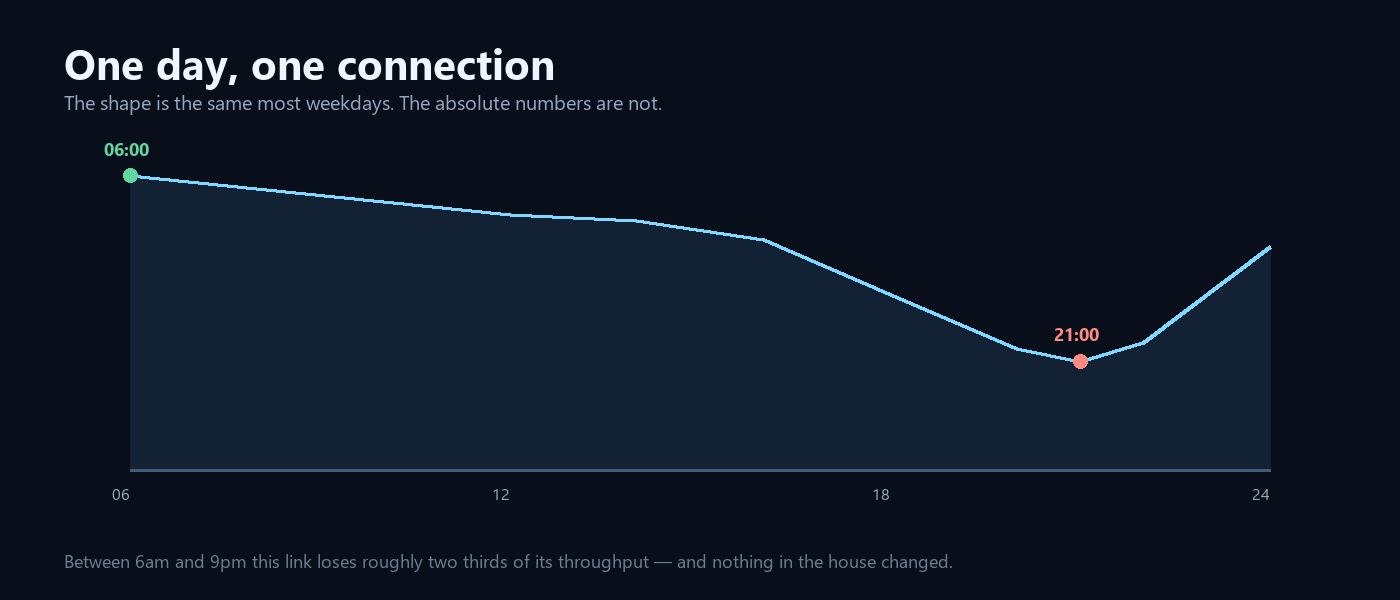
You cannot change the curve. You can change when the heavy work happens, which is the whole of the practical advice: schedule transfers outside the peak, and stop measuring at the worst hour and calling it the truth.
| Clock | Typical cause | Yours to fix? |
|---|---|---|
| Seconds | Handoff, jitter | No |
| Minutes | Queue from an uploader | Yes |
| Hours | Cell demand | Partly — schedule |
| Days | Weather, heat | Partly — shade, airflow |
| Weeks | New dishes in the cell | No |
Why the day has that shape at all
The curve is not arbitrary. Demand rises when people get home and falls when they sleep, and the network is provisioned for something closer to the average than the peak. Every shared medium works this way — mobile networks, cable nodes, and satellite cells alike.
What differs is how sharp the peak is. A cell with a lot of households produces a steep evening dip; a rural cell with few dishes produces a flatter one. Two customers on the same plan in different cells therefore describe the same product in completely different terms, and both are telling the truth.
This is also why reviews are unreliable. Someone who measures at 6am posts a screenshot that a 9pm reader can never reproduce, and neither of them is lying about the clock they used.
Days: weather and heat
Heavy rain fades the link briefly. Snow does something different: it triggers the melt heater, which raises power draw and, on a battery, can cause a brownout that looks like a network fault. Heat throttles the terminal on the hottest afternoons.
Of these, airflow and shade are worth doing and rain is worth ignoring. Weather that persists for days is also the most likely explanation for “it used to be faster last week”.
The clock nobody thinks about: your own devices
There is a sixth variable that is not a clock at all: which device you measured from. A phone in a back bedroom is measuring the dish, the router, two walls and a neighbour’s microwave. The same test on a cable measures the link.
It sounds obvious and it explains a large share of complaints, because the test that feels most convenient — phone in hand, wherever you happen to be standing — is the least representative of the connection itself.
Weeks: the cell fills up
The slowest clock is the one people notice last. New houses in the area add dishes to the same pool, and the ceiling drops gradually — by a few percent a month, not overnight. There is no event to point at, which is why it gets attributed to the hardware.
Nothing you buy changes it. The only responses are a higher-priority plan tier or accepting the new normal, and knowing that is worth more than a new router.
Most speed changes are the hours or weeks clock, neither of which involves a fault. The test is whether the number recovers on its own — a fault does not recover at 2am.
One test tells you the speed at that hour. A week of tests at three times of day tells you your connection — and those are different questions with different answers.
It fixes the minutes clock, which is real. It does nothing for the hours clock, which is usually the one being complained about.
One practical note on measurement: speed tests saturate the link for a few seconds, so running one while someone else is on a call measures the argument rather than the connection. Test when the house is quiet, or accept that the number includes whatever else was happening.
Do this today: run one speed test at 7am, one at 1pm and one at 9pm, and write the three numbers down. The pattern between them tells you which clock you are dealing with — and no amount of hardware shopping replaces that measurement.
This is part of the performance chapter in the Starlink 101 framework. How cells work explains the shared pool behind the evening curve, and why a speed test can be fine while everything stalls covers what the number misses entirely.