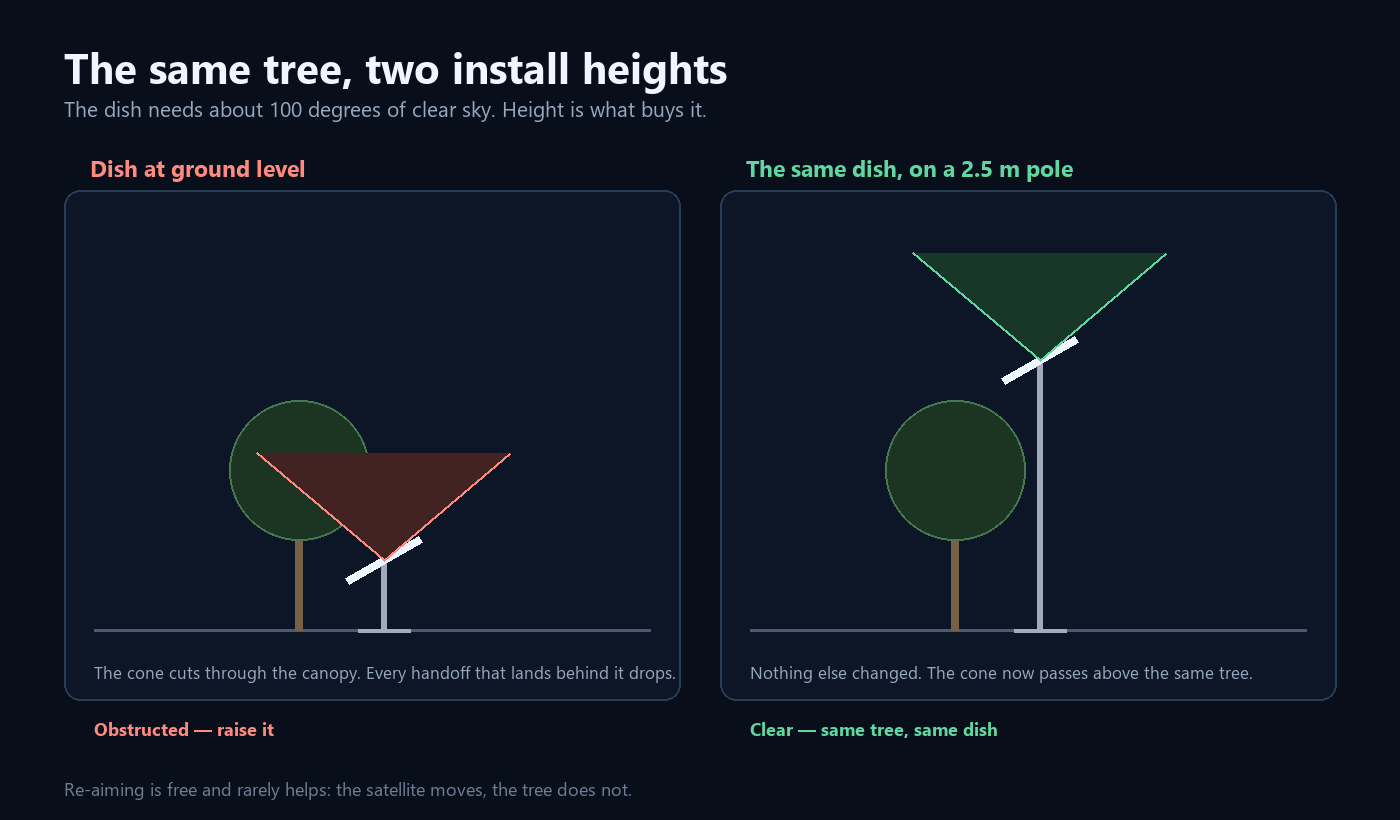
If the app says obstructed and you can see open sky from where you are standing, both things are usually true. The dish is not looking at the sky you are looking at — it is looking at a cone about 100 degrees wide, tilted, and it records everything that ever crossed that cone, not just what is in front of it right now.
That gap between your view and the dish’s view explains almost every “obstructed but clear” complaint. Here is how to tell which version you are in.
Why the number and the sky disagree
Three things create the disagreement. The dish sees a tilted cone roughly 100 degrees wide, not the horizontal view you get from a window. It records losses across the whole cone as it tracks satellites moving overhead. And the percentage is a rolling estimate over recent time, not a measurement of what is in front of the dish at this second.
So “I can see sky” is not evidence of anything. The question is which slice of sky the beam needed at the moment it lost the satellite.
Three checks, five minutes
1. Look at the map, not the percentage. The obstruction figure is a single number, and it is computed from recent traffic. The map underneath it shows where the losses happened, in a polar plot centred on the dish. Open it and look at which wedge is red.
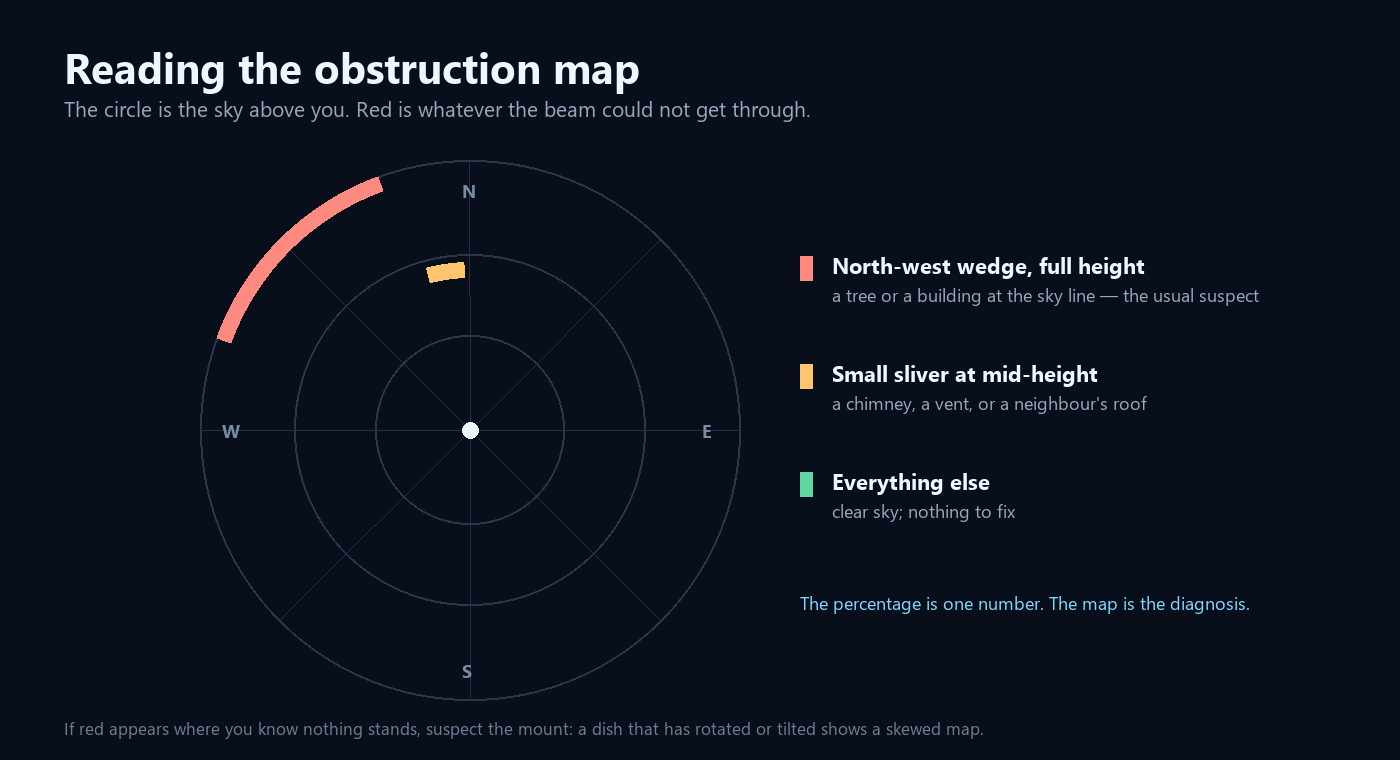
2. Go outside and look along that bearing. The map is oriented with north at the top. If the red is in the north-west, stand under the dish and look north-west, at the elevation the red band sits at — the closer to the centre, the higher in the sky.
Take a phone compass with you. Standing under the dish with a bearing on screen turns “somewhere over there” into a number you can act on, and it lets you check the same bearing again next season to see whether the obstruction grew.
3. Check the timing against the seasons. A reading that climbs in May and falls in November is leaves. A reading that spikes after a storm is snow or a shifted mount. Both look identical in the app and have nothing to do with each other in reality.
If the map explains it, pick the matching fix
Leaves add obstruction without moving anything. The dish does not need to be re-aimed; it needs height or a different mounting point. This is the single most common cause of a reading that changes with the calendar.
Snow on the face blocks the beam exactly like a wall. The heater handles most of it, but a wet heavy fall can outpace the melt. If the reading recovers within a day of clearing, nothing is broken.
A dish that has rotated on its pole, or a bracket that has settled, shows a map that no longer matches the world. Check the mount for movement by hand — a degree or two is invisible but enough to put an old clear path into a tree.
A chimney, a vent pipe, a mast or a bird perch. Small high obstructions cost little but show up clearly. Clean the face, check for a perch, and if the percentage is under about one percent, leave it alone.
The figure is a rolling estimate. If the map is clean and the number is not, it is describing history rather than the present. Reset the statistics in the app and re-check after a day before changing anything physical.
When it is not obstruction at all
Two faults get blamed on obstruction because the app mentions it:
A power sag. A brief voltage dip resets the radio, the reconnect looks like a sky problem, and the obstruction figure ticks up because the dish lost the satellite mid-handoff. If the drops cluster rather than spread evenly, suspect power before the sky — the reboot article covers that path in detail.
A failing cable. A damaged or waterlogged cable produces intermittent loss that the app reports as a service interruption, and people start trimming trees. Reseat the connector and look inside it before you buy a saw.
What the percentages mean in practice
| Reading | What you will notice | What to do |
|---|---|---|
| Under 1% | Nothing | Nothing |
| 1–5% | Occasional brief drops | Fix only if it bothers you |
| 5–10% | Regular interruptions | Height or a new mounting point |
| Over 10% | Frequent, noticeable | Move the dish; this will not resolve itself |
A few percent of obstruction is normal and costs you almost nothing — the dish routes around it. Between roughly one and five percent you will notice occasional brief dropouts. Above that, you will feel it, and it is worth fixing.
Call support when the map shows obstruction in a direction where you can prove nothing stands, and the reading persists after a statistics reset and a mount check. Bring the map screenshot and the bearing; “obstructed but there is nothing there” plus a photo is a different conversation from the same sentence alone.
Resetting statistics is worth doing once, deliberately, when you want a clean baseline — for example the day after you trim a tree. It does not fix anything, but it stops you comparing a current installation against a number that includes a season of leaves you have since removed.
Do this today: open the obstruction map, note the bearing of the largest red area, then walk outside and look along that bearing from directly under the dish — not from your window. The two views differ more often than people expect, and the answer is usually standing right there.
This is the third entry in the troubleshooting index. If your symptom is the dish restarting rather than losing sight, start with reboots in bursts instead. For the geometry behind the 100-degree cone, how the dish talks to a satellite explains why the shape matters.