A dish that keeps disconnecting is almost never a satellite problem. In practice the causes stack up in a predictable order: an obstruction the terminal hits during a handoff, a power supply that sags under load, a cable that has taken on water, the Wi-Fi inside the house, and only then something on the network side.
That order matters, because it is also the order of how cheap each fix is. Work down it and you will usually find the fault in the first two steps, with nothing to buy.
Three checks, five minutes, no tools
1. Read the obstruction percentage. In the app, open Statistics and look at Obstructions. The number is cumulative since install, so a figure above roughly 1 to 2 percent means the dish has been losing line of sight regularly. Anything near zero rules obstruction out as the main cause.
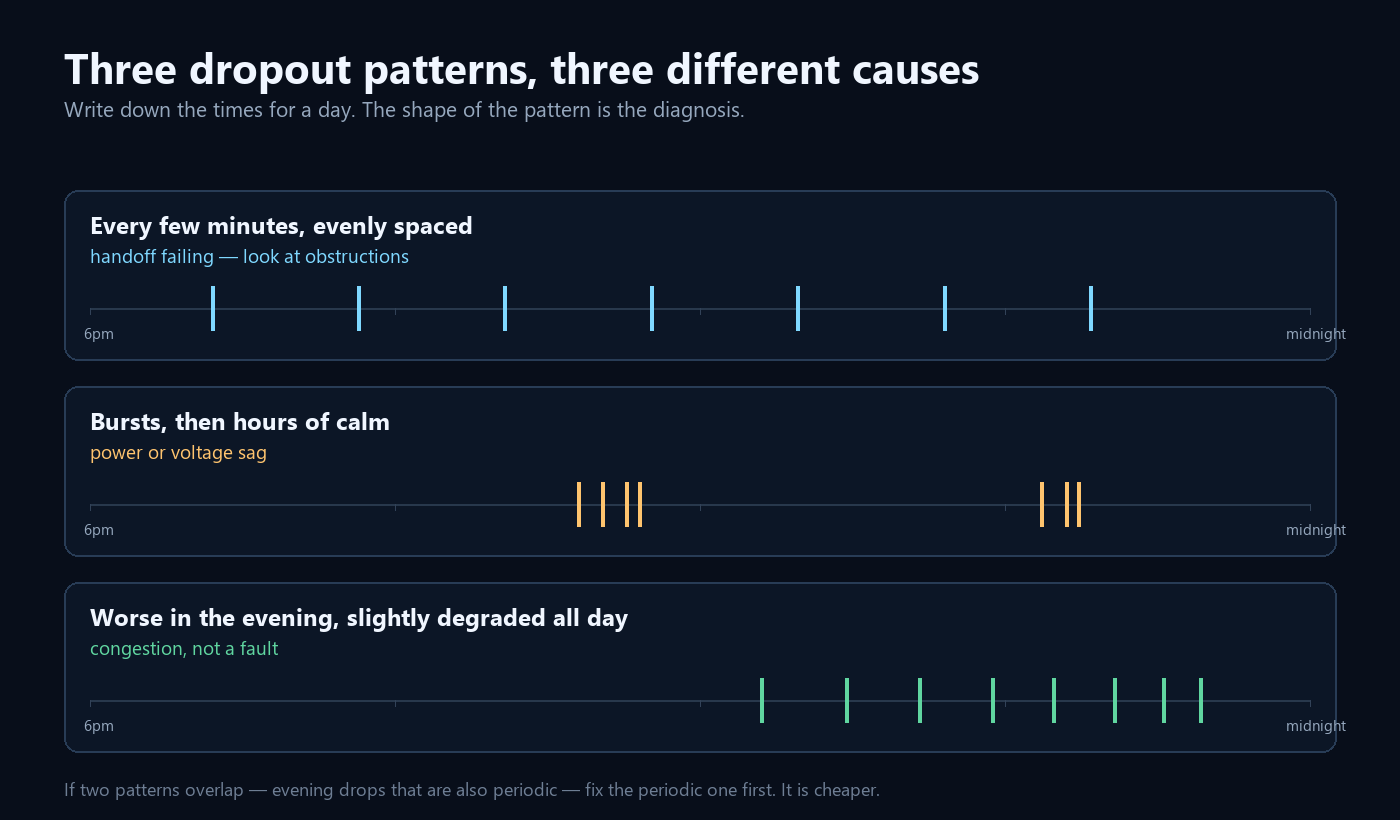
2. Write down the times. Next time it drops, note the clock time. Do this for a day and you will have three to five timestamps, which is enough to see a pattern. The shape of the pattern is the diagnosis — it is worth more than any single reading in the app, and the chart after these three steps shows what each shape means.
3. Reseat the cable at both ends. Unplug at the dish and at the router, look into the connector for moisture, green tint or a bent pin, then push firmly until it clicks. This costs ninety seconds and fixes a surprising share of intermittent faults, especially after a storm.
Before you spend anything, settle one question: is it disconnecting, or is it stalling? The two feel identical and are not. A disconnect shows as the app reporting no service, or every device losing the internet at once. A stall shows as one device buffering while the rest of the house is fine. If you cannot tell, watch the app while the problem happens — the connection status is either up or it is not.
If those three are clean, work down this list
A voltage sag makes the dish reboot rather than degrade. Common causes: a long or thin DC run, a converter rated for peak instead of continuous, a cigarette plug with weak spring tension, or a cold night when the heater raises the load. Measure the input voltage under load — below about 11.5 V on a 12 V system is a fault, not a coincidence.
The satellite link is fine and the local network is not. Test by plugging one device into the router by cable for an evening. If the wired connection never drops, stop looking at the sky — the problem is channel congestion, distance, or a device that keeps losing its lease.
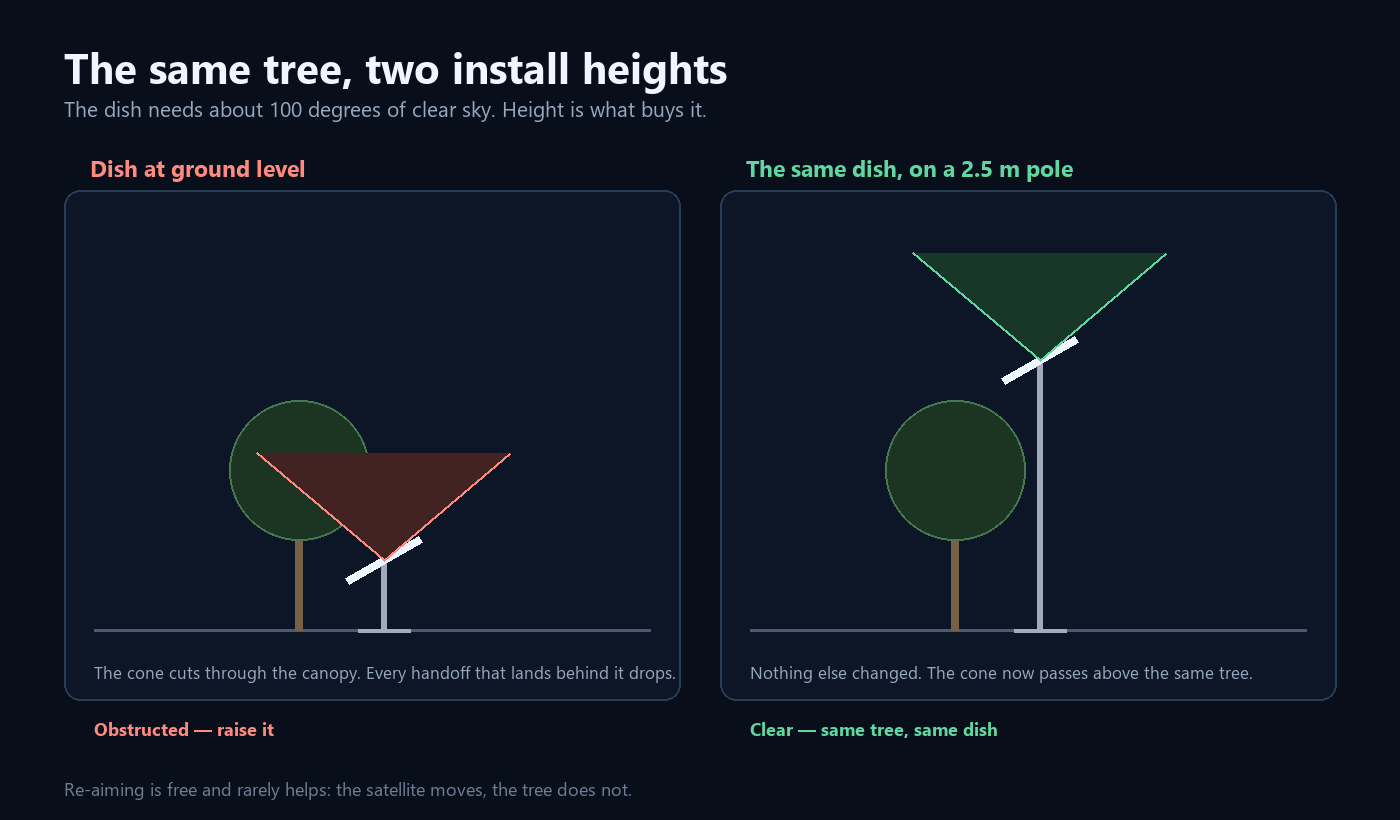
The terminal protects itself in high heat, and a dish in full afternoon sun on a dark roof can get there. It reduces power and can restart. Shade the dish face, or raise it a few centimetres for airflow, and see whether the afternoon drops disappear.
Firmware changes how the terminal handles handoffs and power, and the first week after a major update is the week people notice new behaviour. Give it three or four days before changing the install. If drops were absent before and persist after a fortnight, that is a real regression worth reporting rather than something you can fix locally.
If other dishes in the area behave the same way at the same time, nothing in your install is at fault. Congestion produces slow evenings, not disconnects — but maintenance and outages do produce disconnects. Check the app’s outage information before replacing hardware.
When to stop and contact support
There is a point where more fiddling is a waste of an evening. Contact support when all of the following are true:
- The dish is on its own mains supply, not a 12 V system, with the cable that came in the box.
- The obstruction figure is near zero.
- It has been happening for three days, not three hours.
- You reseated the cable and it made no difference.
Worth knowing what support can actually see. They can read signal quality, obstruction history, reboot counts and error events from the dish remotely — which means a vague report wastes both your time and theirs. A timestamp list plus a screenshot of Statistics lets them skip straight to the right log.
Bring three things to that conversation: a screenshot of the Statistics page, your timestamp list, and the dish’s serial number. A support agent can act on a pattern; they cannot act on “it keeps dropping”.
The two-minute test that settles the argument
Run a ping to a stable address for ten minutes during the hour your connection usually fails, and watch for spikes rather than averages. A steady 40 ms is a healthy link. Forty milliseconds that jump to several hundred every couple of minutes is a handoff or power problem — and that number is exactly what support will ask you for.
Do it twice, ideally: once during a good hour and once during a bad one. The difference between the two runs tells you how much of what you are feeling is the network and how much is your own tolerance for a stutter. Most people are surprised by how narrow the gap is once it is written down as numbers.
One seasonal trap: faults that appear in late autumn and vanish in spring are almost always the heater. It raises the load at exactly the moment batteries deliver less, so a marginal power design fails only in the cold months. If your drops have a season, the fix is electrical rather than radio.
Do this today: write down the time of the next three drops before you change anything. Three timestamps turn a vague complaint into a diagnosis, and they cost you nothing but a note on your phone.
This is the first entry in the troubleshooting index, which is ordered by how often each fault actually happens. If the pattern points at power rather than the sky, cable length and voltage drop explains why a marginal run fails under load, and running on 12 V covers the wiring side in detail.